# THX Network

Allows you to launch quests and rewards in gaming and fintech. Backed by EU Horizon 2020 and Techstars. Shut down 1st of February, 2025.

## Shut Down and Claim USDC for THX token holders <a href="#a573" id="a573"></a>

Following the vote to withdraw THX token liquidity and unwind the tokenomics, 795 accounts can claim approximately $50,000 in USDC, distributed proportionally to their THX token balances. Find the links to the claim and read more about the shut down in the article linked below.

{% embed url="<https://medium.com/thxprotocol/sunsetting-thx-network-1st-of-february-2025-d51fd1b38eea>" %}

### Gratitude to Our Community

To our employees, customers, and backers — **thank you**. None of this would have been possible without your trust and enthusiasm. A special thanks to our advisors and fellow founders at Techstars, and the broader THX Network community for believing in us and being part of this journey.

{% hint style="info" %}
**Tip:** If you have any questions [**join our Discord**](https://discord.com/invite/TzbbSmkE7Y). We remain active there till 31st of July 2025.
{% endhint %}

## About THX Network

We make it our mission to make quest and rewards more accessible in gaming and fintech. With THX Network you create campaigns that integrate seamlessly in your app and game and offer a frictionless user experience.

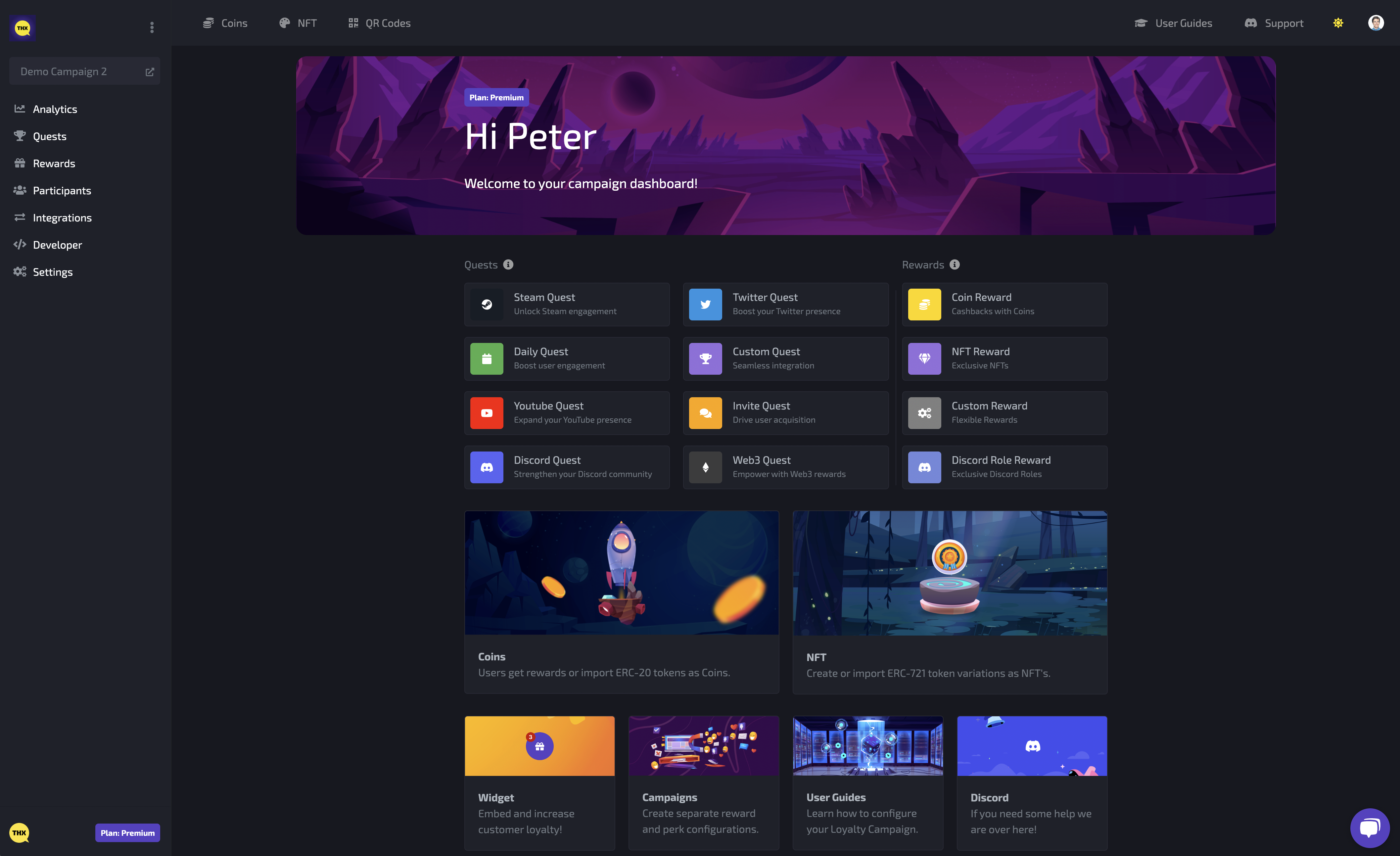
<figure><img src="https://1499671166-files.gitbook.io/~/files/v0/b/gitbook-x-prod.appspot.com/o/spaces%2Fda0CPvFjFKQsHDL5o9xa%2Fuploads%2FoAExBalI4JEZY2OQUhzb%2FScreenshot%202023-12-21%20at%2011.34.18.png?alt=media&amp;token=3f149fe9-2992-4e32-b2d9-a81fe25e9070" alt=""><figcaption><p>Homepage of THX Dashboard </p></figcaption></figure>

Don't take our word for it! Read what others had to say about us:

> "Essentially, we wanted a reliable partner who can provide us with the infrastructure we need for our Quest product, allowing os to focus solely on designing the quests and our game."\
> \- [Behfar Iranmanesh](https://www.linkedin.com/in/behfar-iranmanesh-3223a6154/), CEO at Chrono Games (Forest Knight)

> "THX Network's tools have added a new layer of community connectivity. Gala Reward Boxes and exclusive roles have set a new standard for player engagement. It's the embedded nature and effectiveness of these campaigns that excite us the most about this partnership,"\
> \- [Jason Brink](https://www.linkedin.com/in/bitbender/), President of Blockchain at Gala


# Getting Started

We aim for as little developer effort as possible with our solutions and integrating the widget is as easy as embedding one line of code.

Watch the video instructions below or follow the three easy steps described below to install the widget and smart wallet on your website.

{% embed url="<https://youtu.be/6XvN2SfswvI>" %}
Screencast demonstrating the integration of the embed script in a Vue website.
{% endembed %}

### 1. Embed campaign widget

Copy the script with the clipboard button and make sure it is loaded on the pages where you want the widget to appear. **No further integration effort is required!**

<figure><img src="https://1499671166-files.gitbook.io/~/files/v0/b/gitbook-x-prod.appspot.com/o/spaces%2Fda0CPvFjFKQsHDL5o9xa%2Fuploads%2FRiT2ggT1lza99jw2RyDw%2FScreenshot%202023-12-21%20at%2011.36.09.png?alt=media&amp;token=54fc1798-4652-46b3-90c6-7510b5ac2e39" alt=""><figcaption><p>Example of campaign widget embed script</p></figcaption></figure>

### 2. Configure campaign widget

Change the appearance of the widget launcher by setting the *color* used for various UI elements to align it with your branding.

<figure><img src="https://1499671166-files.gitbook.io/~/files/v0/b/gitbook-x-prod.appspot.com/o/spaces%2Fda0CPvFjFKQsHDL5o9xa%2Fuploads%2Fjz0RqycvEdLS138eyEo1%2FScreenshot%202023-12-21%20at%2011.34.41.png?alt=media&amp;token=cdd2393f-d121-4c58-b18b-f82e92649763" alt=""><figcaption><p>Example of widget appearance configuration</p></figcaption></figure>

### Native app based on Flutter mobile UX experience

The native mobile experience with an app based on Flutter is great.&#x20;

* Auth redirects work properly
* Switching Flutter views maintains login state
* Closing app maintains login state

{% embed url="<https://youtu.be/zU3Bpfkofrg>" %}
Proof of concept for a Flutter app using WebView to load the campaign page
{% endembed %}


# Analytics

Campaign analytics provide insights into overall quest and reward activity. You can scope your data to a specific time range and see who your top 10 campaign participants are.

<figure><img src="https://1499671166-files.gitbook.io/~/files/v0/b/gitbook-x-prod.appspot.com/o/spaces%2Fda0CPvFjFKQsHDL5o9xa%2Fuploads%2F8TAH4DrIbodzcjx1m1Ob%2Fimage.png?alt=media&amp;token=f0314320-ff5a-45f2-8a97-bca088cef802" alt=""><figcaption></figcaption></figure>


# Quests

Your audience is able to earn points with various Quests that can be configured to incentivise particular user engagement.

{% content-ref url="/pages/gHMWLQxxZgPRo3rspU9S" %}
[Daily Quests](/campaign-managers/quests/daily-quests)
{% endcontent-ref %}

{% content-ref url="/pages/vv9jiDkjxJ6GASDeVT22" %}
[Invite Quests](/campaign-managers/quests/invite-quests)
{% endcontent-ref %}

{% content-ref url="/pages/9X0AWClBsL6j5mgbQKhb" %}
[Twitter Quests](/campaign-managers/quests/twitter-quests)
{% endcontent-ref %}

{% content-ref url="/pages/8tpVTi1xwqlzw6sUbSz6" %}
[Discord Quests](/campaign-managers/quests/discord-quests)
{% endcontent-ref %}

{% content-ref url="/pages/Q69EcYqfDde0xQWHYMXw" %}
[Custom Quests](/campaign-managers/quests/custom-quests)
{% endcontent-ref %}

{% content-ref url="/pages/jyO8mYvy8jOQBcG6hLzL" %}
[Web3 Quests](/campaign-managers/quests/web3-quests)
{% endcontent-ref %}

{% content-ref url="/pages/7lZv6qsXC4ugmCXKKR9L" %}
[Webhook Quests](/campaign-managers/quests/webhook-quests)
{% endcontent-ref %}

{% content-ref url="/pages/XQlXTnqWSIZs3yihMuY0" %}
[Steam Quests](/campaign-managers/quests/steam-quests)
{% endcontent-ref %}


# Daily Quests

Daily quests are a great tool to increase user retention.

### **Dashboard configuration**

For a daily quest you only have to configure it's card **title**, **description** and the point **amount** a claiming user can earn.&#x20;

<figure><img src="https://1499671166-files.gitbook.io/~/files/v0/b/gitbook-x-prod.appspot.com/o/spaces%2Fda0CPvFjFKQsHDL5o9xa%2Fuploads%2Fn5XJqKcgAPJqEF4lkAxZ%2FScreenshot%202023-02-20%20at%2010.31.17.png?alt=media&amp;token=4b5519ed-558c-431d-9719-f200ef6efaef" alt=""><figcaption><p>Daily quest configuration modal</p></figcaption></figure>

{% hint style="info" %}
A "streak" feature (users earn more when claiming consecutive days) will be added to this quest type soon!
{% endhint %}

### **Widget appearance**

You can personalise the quest title and description and based on a users last claim a countdown timer will be shown. This timer counts down to the moment in time where the user is allowed to claim again.

<figure><img src="https://1499671166-files.gitbook.io/~/files/v0/b/gitbook-x-prod.appspot.com/o/spaces%2Fda0CPvFjFKQsHDL5o9xa%2Fuploads%2FdzN2KHceDCnxa3NFaigd%2FScreenshot%202023-02-20%20at%2010.35.49.png?alt=media&amp;token=8b44e7cb-d412-46e5-b440-2007b1ea0f98" alt=""><figcaption><p>Daily quest widget card</p></figcaption></figure>


# Invite Quests

Invite quests allow your community to support your user acquisition. The invites can be set up double sided meaning both the inviter and invitee earn points.

### Dashboard configuration

A referral reward is configured in the dashboard and (similar to all other point rewards) requires a **title**, **description** and **amount** of points an user earns for inviting a friend.&#x20;

The 'Required Quest' options allow you to set the quest that the '**Invitee**' needs to complete before the points are awarded. The 'Quest Locks' allows you to set quests the user needs to complete to be able to participate in the invite quest. This powerful combination allows you to guard the quest from low level farming by requiring social quests and/or requiring things like a sign-up, purchase or token holding for both the inviter and invitee. &#x20;

<figure><img src="https://1499671166-files.gitbook.io/~/files/v0/b/gitbook-x-prod.appspot.com/o/spaces%2Fda0CPvFjFKQsHDL5o9xa%2Fuploads%2F5Zj0GKgK12wW6tw6pAeg%2Fimage.png?alt=media&amp;token=d5638bed-95f8-4d62-a251-058b5fcb0420" alt=""><figcaption></figcaption></figure>

### Front-end Appearance in the Widget

**Invite Link's will only be shown for authenticated users.** The URL contains information about the account sharing the URL. Your audience will be able to copy the referral URL for sharing.

<figure><img src="https://1499671166-files.gitbook.io/~/files/v0/b/gitbook-x-prod.appspot.com/o/spaces%2Fda0CPvFjFKQsHDL5o9xa%2Fuploads%2FLboj0Vvyds4eW9mkFAwR%2Fimage.png?alt=media&amp;token=6ed6c2da-f84e-4f94-b4b9-4a6fb349dc16" alt="" width="563"><figcaption></figcaption></figure>


# Twitter Quests

Quests with social conditions stimulate engagement in other channels you are using.

### Dashboard configuration

A conditional reward is configured in the dashboard and (similar to all other point quests) requires a **title**, **description** and **amount** of points to transfer to the user eligible for the reward. In addition, you can set a end date plus add an image to make the quest stand out in [your widget](/campaign-managers/getting-started).

<figure><img src="https://1499671166-files.gitbook.io/~/files/v0/b/gitbook-x-prod.appspot.com/o/spaces%2Fda0CPvFjFKQsHDL5o9xa%2Fuploads%2FIPSdL5ANaXEQwPDIuVHy%2Fdashboard.thx.network_pool_6286444ba9838bc5ed9fe117_integrations_twitter%20(2).png?alt=media&amp;token=a266999f-9897-4ebb-91ff-d44e9deb567c" alt=""><figcaption></figcaption></figure>

### Requirements

The configuration of a **quest condition** consists of 3 parts:&#x20;

1. **Provider**\
   A range of platforms that allow for integration is available here. (&#x65;*.g. Twitter)*
2. **Requirement**\
   Select the type of user behaviour you want to reward. We use the API's of the selected platform to validate if this behaviour has occurred. (&#x65;*.g. Follow)*
3. **Followers Count**\
   To increase the value generated by your quest you can set a minimum follower count for participants. This will also prevent abuse by the most obvious bots using new accounts.&#x20;
4. **Tweet URL**\
   Provide the URL of the post in for which you're creating the quest.<br>

<figure><img src="https://1499671166-files.gitbook.io/~/files/v0/b/gitbook-x-prod.appspot.com/o/spaces%2Fda0CPvFjFKQsHDL5o9xa%2Fuploads%2FBC28YtUHzoCytmExJSOC%2Fdashboard.thx.network_pool_6286444ba9838bc5ed9fe117_integrations_twitter%20(3).png?alt=media&amp;token=2e4ec3cf-1879-49de-98a0-88c7d798ffcf" alt=""><figcaption></figcaption></figure>

<details>

<summary>How sybil resistant are conditional rewards?</summary>

Conditional rewards can only be claimed once per platform user ID, meaning that if you have the same Twitter account connected to multiple THX accounts, only one of these accounts will be eligible for claiming the conditional reward.

When a user claims a conditional rewards we ask the user to connect their external platform account so we can validate the expected user behaviour through the platform API's on behalf of the connected user.

</details>

### X Automation

Enable X automation to save time managing your campaign and keep your audience entertained with new ways to earn points.

{% content-ref url="/pages/vDRCZYVzTt9LtwEQz6Se" %}
[Twitter, now X](/campaign-managers/integrations/twitter-now-x)
{% endcontent-ref %}

### Widget appearance

Social quests will show a little different depending on the selected platform and interaction type.&#x20;

In general the provided title, description and earn-able point amount are show. Next to that we show a hint towards the platform interaction type and when possible we link to the related content or show more specifics about the condition.

<figure><img src="https://1499671166-files.gitbook.io/~/files/v0/b/gitbook-x-prod.appspot.com/o/spaces%2Fda0CPvFjFKQsHDL5o9xa%2Fuploads%2Faly8sj3WAqjyReVCLCom%2Fthx.network_.png?alt=media&amp;token=fd21c969-3c5f-4ecb-97c5-5601159ace20" alt=""><figcaption></figcaption></figure>


# Discord Quests

Quests with social conditions stimulate engagement in other channels you are using.

### Dashboard configuration

A conditional reward is configured in the dashboard and (similar to all other point quests) requires a **title**, **description** and **amount** of points to transfer to the user eligible for the reward. In addition, you can set a end date plus add an image to make the quest stand out in [your widget](/campaign-managers/getting-started).

<figure><img src="https://1499671166-files.gitbook.io/~/files/v0/b/gitbook-x-prod.appspot.com/o/spaces%2Fda0CPvFjFKQsHDL5o9xa%2Fuploads%2F5Mwnsiu3sQmBXz5rqusy%2Fdashboard.thx.network_pool_6286444ba9838bc5ed9fe117_integrations_twitter%20(5).png?alt=media&amp;token=ee89acbf-dbac-4fe7-bee2-9869a5f90e91" alt=""><figcaption></figcaption></figure>

### Requirements

The configuration of a **quest condition** consists of 3 parts:&#x20;

1. **Provider**\
   A range of platforms that allow for integration is available here. (&#x65;*.g. Discord)*
2. **Requirement**\
   Select the type of user behaviour you want to reward. We use the API's of the selected platform to validate if this behaviour has occurred. \
   \
   a) **Server Joined:** give points for joining your server. Provide your server ID by enabling 'Developer Mode' in 'App settings' > 'Advanced' and right click your server icon to the Copy ID. Also provide an invite URL\
   b) **Message**: give points for activity in  your Discord. Enter channels to be tracked, daily limit of messages and amount of days before the quest restarts.\
   c) **Role:** give points for people holding certain roles. Select the role from the list.

{% hint style="info" %}
Message and Role requirements need you to [install the THX Discord Bot](/campaign-managers/integrations/discord).
{% endhint %}

<figure><img src="https://1499671166-files.gitbook.io/~/files/v0/b/gitbook-x-prod.appspot.com/o/spaces%2Fda0CPvFjFKQsHDL5o9xa%2Fuploads%2FBC28YtUHzoCytmExJSOC%2Fdashboard.thx.network_pool_6286444ba9838bc5ed9fe117_integrations_twitter%20(3).png?alt=media&amp;token=2e4ec3cf-1879-49de-98a0-88c7d798ffcf" alt=""><figcaption></figcaption></figure>

<details>

<summary>How sybil resistant are conditional rewards?</summary>

Conditional rewards can only be claimed once per platform user ID, meaning that if you have the same Twitter account connected to multiple THX accounts, only one of these accounts will be eligible for claiming the conditional reward.

When a user claims a conditional rewards we ask the user to connect their external platform account so we can validate the expected user behaviour through the platform API's on behalf of the connected user.

</details>

### Widget appearance

Social quests will show a little different depending on the selected platform and interaction type.&#x20;

In general the provided title, description and earn-able point amount are show. Next to that we show a hint towards the platform interaction type and when possible we link to the related content or show more specifics about the condition.

<figure><img src="https://1499671166-files.gitbook.io/~/files/v0/b/gitbook-x-prod.appspot.com/o/spaces%2Fda0CPvFjFKQsHDL5o9xa%2Fuploads%2FhYEcrl9vmwGNRJsHfKdi%2Fthx.network_%20(1).png?alt=media&amp;token=b9aa3820-9f17-484b-9de0-6c46a4bbaeb2" alt=""><figcaption></figcaption></figure>


# Custom Quests

Custom Quests enable you to incentivise every touchpoint in your customer journey.

### Dashboard configuration

A Custom Quest is configured in the dashboard and (similar to all other point rewards) requires a **title**, **description** and **amount** of points to transfer to the user eligible for the reward.

<figure><img src="https://1499671166-files.gitbook.io/~/files/v0/b/gitbook-x-prod.appspot.com/o/spaces%2Fda0CPvFjFKQsHDL5o9xa%2Fuploads%2FGD11cggXTtRk423rZs3D%2FScreenshot%202023-03-15%20at%2010.04.40.png?alt=media&amp;token=5d097081-3779-46f4-9da4-a6b0f63b42b7" alt=""><figcaption><p>Example of a milestone rewards</p></figcaption></figure>

Custom Quests are a very flexible quest type that allows to reward specific user behaviour in your application. This means that (after adding a little bit of code to your app) you can incentivize all sort of user interactions in your app!

Examples of important customer touch points that could be incentivised:

* **User completes profile**
* **Client purchases product**
* **Player levels up**
* And more...

### Create Events

Using THX SDK you will be able to register system events for an Identity connected to your user. You can use these events for custom quest purposes.

```javascript
await thx.events.create({ name: 'level_up', identity: 'a6021617-9aab-4194-b2af-a4dd0cc96f84' })
```

{% content-ref url="/pages/iB5RZgY2ptgY6L6x4zzZ" %}
[Identity](/developers/js-sdk/identity)
{% endcontent-ref %}

{% content-ref url="/pages/K4YfG7OwMfDwyG7g8UX2" %}
[JS SDK](/developers/js-sdk)
{% endcontent-ref %}

### Widget appearance

The Custom Quest card in the widget will show a *Not available* state for unauthenticated users or users that are not eligible for the reward.

<figure><img src="https://1499671166-files.gitbook.io/~/files/v0/b/gitbook-x-prod.appspot.com/o/spaces%2Fda0CPvFjFKQsHDL5o9xa%2Fuploads%2FW4Ggq64Vl6fcRs4J8wJG%2FScreenshot%202023-03-15%20at%2010.18.09.png?alt=media&amp;token=262f700d-04c6-4e01-b8f3-4e2b4cfb8ac4" alt=""><figcaption><p>Milestone rewards not available for authenticated user</p></figcaption></figure>

As soon as your app runs the webhook for a particular user the card will show that user a progress bar for the amount of reward claims available and the amount of rewards claimed.

<figure><img src="https://1499671166-files.gitbook.io/~/files/v0/b/gitbook-x-prod.appspot.com/o/spaces%2Fda0CPvFjFKQsHDL5o9xa%2Fuploads%2Fae8ObXfb5BDS3BnpiGdM%2FScreenshot%202023-03-15%20at%2010.19.02.png?alt=media&amp;token=8b884176-15c1-4531-8b01-67ab813fc488" alt=""><figcaption><p>2 out of 3 milestoned rewards claimed for authenticated user</p></figcaption></figure>


# Web3 Quests

Reward users' coin balance or NFT ownership using smart contracts.

A very powerful quests type that let's you incentivize on-chain activity. For instance check if a user's wallet has performed the following:

{% hint style="danger" %}
being phased out in favour of custom quests and webhooks - consult the team on [Discord](https://discord.com/invite/uDWJ36CUMY) or [Telegram](https://t.me/thxnetwork) before implementing
{% endhint %}

* holds a certain ERC20 balance
* holds a certain NFT token
* staked a certain amount of tokens

<figure><img src="https://1499671166-files.gitbook.io/~/files/v0/b/gitbook-x-prod.appspot.com/o/spaces%2Fda0CPvFjFKQsHDL5o9xa%2Fuploads%2FmqDGlixvLoRJMqvjKba3%2Fimage.png?alt=media&amp;token=4092334f-15f7-4f55-9214-0270197bb34b" alt="" width="375"><figcaption></figcaption></figure>

Currently supported chains are: Ethereum, Binance Smart Chain, Polygon, Polygon zkEVM, Arbitrum, Linea. If you want support for another chain, let us know in our [#suggestions channel on Discord](https://discord.gg/thx-network-836147176270856243).&#x20;

<figure><img src="https://1499671166-files.gitbook.io/~/files/v0/b/gitbook-x-prod.appspot.com/o/spaces%2Fda0CPvFjFKQsHDL5o9xa%2Fuploads%2F9lsSdTqU4tMrmbyuAWQd%2Fimage.png?alt=media&amp;token=60732ff0-0be0-416d-b7b7-89c312e96a53" alt=""><figcaption></figcaption></figure>


# Webhook Quests

Validate quest behavior using your own API endpoints and set optional custom point amounts.

This quest type allows you to provide your own quest validation logic. It's required to configure an API endpoint for this quest that we can send a validation request to.

{% content-ref url="/pages/VUQOO7SsxVyCsSCZffOU" %}
[Webhooks](/developers/webhooks)
{% endcontent-ref %}

<figure><img src="https://1499671166-files.gitbook.io/~/files/v0/b/gitbook-x-prod.appspot.com/o/spaces%2Fda0CPvFjFKQsHDL5o9xa%2Fuploads%2FeGfp4GGUq5Q8J85jl5VE%2FScreenshot%202024-07-01%20at%2017.10.32.png?alt=media&amp;token=91a9763e-70d9-47ae-8274-970277ce7bfe" alt=""><figcaption><p>Example of Webhook Quest configuration</p></figcaption></figure>

#### Custom Amount

You can enable the **custom amount** setting which will allows you to calculate a point amount on your side and return in the response of the webhook call. We will then transfer that amount of points to the user.

#### Webhook Response

Your webhook should create a response like this. Note that the amount property is optional.

```typescript
{
    result: boolean, // Validated (true) or invalidated (false) quest entry
    amount?: number, // Your custom point amount (0 or more)
}
```

####


# Steam Quests

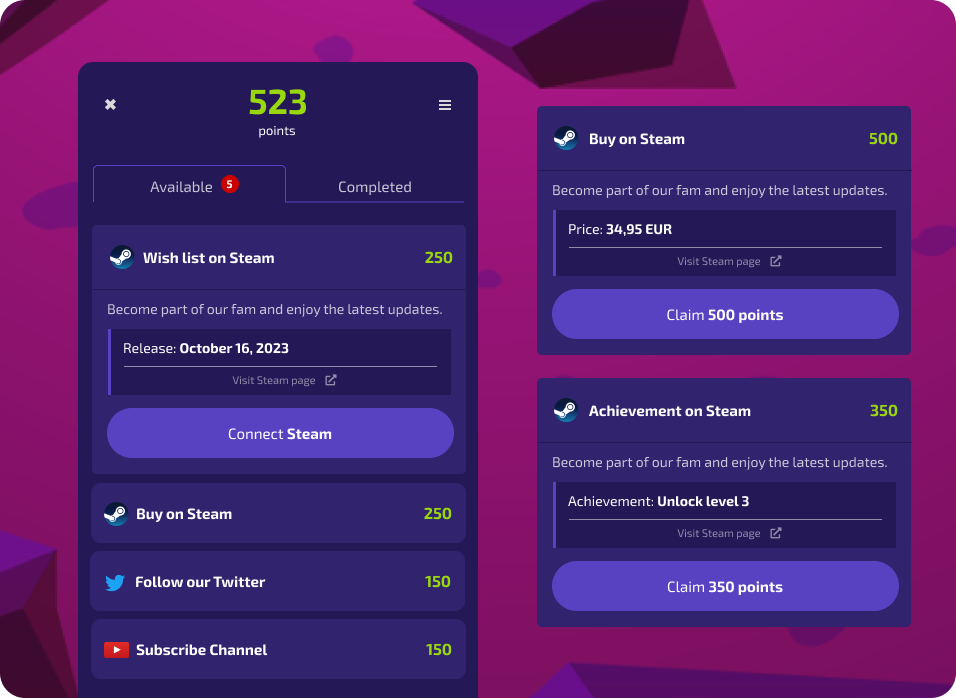
Embark on a gaming journey by purchasing, wishlisting games, and earning Steam achievements.

<figure><img src="https://1499671166-files.gitbook.io/~/files/v0/b/gitbook-x-prod.appspot.com/o/spaces%2Fda0CPvFjFKQsHDL5o9xa%2Fuploads%2FVjX4pB2yeKuMVn53sbiA%2Fimage.png?alt=media&amp;token=8d39e352-9b78-4b06-9588-b7b114c9ea3d" alt=""><figcaption></figcaption></figure>

* Buy a game on Steam
* Wishlist a game on Steam
* Earn a Steam achievement


# Quest Locks

Allows you to gate quests with one or more other quests. This opens up endless possibilities of tiered campaigns.

You can find 'Quest Locks' in the create quests configuration modal screen when selecting to create a new quests.

<figure><img src="https://1499671166-files.gitbook.io/~/files/v0/b/gitbook-x-prod.appspot.com/o/spaces%2Fda0CPvFjFKQsHDL5o9xa%2Fuploads%2Fea14L7ap0WgnqgtVszQA%2Fimage.png?alt=media&amp;token=e228e78d-38f2-4648-9784-8f259c40e4dd" alt=""><figcaption></figcaption></figure>

Every guest type can be used to lock a quest, meaning that completing that quest is required for the user to proceed. Locked quests are visible to users but cleared marked as locked.

<figure><img src="https://1499671166-files.gitbook.io/~/files/v0/b/gitbook-x-prod.appspot.com/o/spaces%2Fda0CPvFjFKQsHDL5o9xa%2Fuploads%2FlwvuA7htzWiYR1ojvuXw%2Fimage.png?alt=media&amp;token=bc5141d1-165d-4f72-b38a-17f06a33fdf9" alt="" width="375"><figcaption></figcaption></figure>


# Rewards

Campaign participants earn points with quests and can in turn redeem these points for rewards. Use a variety of Rewards to incentivise your participants to start collecting more points.

{% content-ref url="/pages/Cw5GBq6tPYO3PnR5Vj5c" %}
[Coin Rewards](/campaign-managers/rewards/coin-rewards)
{% endcontent-ref %}

{% content-ref url="/pages/7mcj45Z9PzS8VqVoazQx" %}
[NFT Rewards](/campaign-managers/rewards/nft-rewards)
{% endcontent-ref %}

{% content-ref url="/pages/ucb8l0lOBPMYkdp7lFvS" %}
[Custom Rewards](/campaign-managers/rewards/custom-rewards)
{% endcontent-ref %}

{% content-ref url="/pages/yabpZ2vnZrSvdKREvFWF" %}
[Coupon Rewards](/campaign-managers/rewards/coupon-rewards)
{% endcontent-ref %}

{% content-ref url="/pages/mW1rgxNdWsrD13wL4OyY" %}
[Discord Role Rewards](/campaign-managers/rewards/discord-role-rewards)
{% endcontent-ref %}

### Reward Distribution

Apart from letting your campaign participants redeem their hard earned points for rewards, you can generate unique QR codes for claiming NFT rewards and gate reward redemption for holders of a  specific coin or an NFT.

{% content-ref url="/pages/9GLZZtIHRVEPX2fvTP80" %}
[QR codes](/developers/qr-codes)
{% endcontent-ref %}


# Coin Rewards

Coin Rewards enable your audience to redeem their accumulated points for ERC-20 tokens.

In order to create a coin reward you will need to have Coin contracts available in your account. You can either **create a coin yourself** or **import an existing coin contract** in the dashboard.

{% content-ref url="/pages/v9irFIL9s35iygXRNtIV" %}
[Coins](/campaign-managers/coins)
{% endcontent-ref %}

### Dashboard configuration

A coin reward is configured in the dashboard and requires a **title, description** and optionally an **image** to display in the widget user interface.

<figure><img src="https://1499671166-files.gitbook.io/~/files/v0/b/gitbook-x-prod.appspot.com/o/spaces%2Fda0CPvFjFKQsHDL5o9xa%2Fuploads%2FqFmspU65FIjy0Dqi9KU6%2FScreenshot%202023-03-24%20at%2014.57.46.png?alt=media&amp;token=3bb8a6af-b256-431e-ac5a-58933f8cb49f" alt=""><figcaption><p>Example of a Coin Reward where 500 points can be redeemed for 5000 THX-DEMO coins.</p></figcaption></figure>

#### Coin

Select the Coin Contract for this reward. If you select an **imported** or **limited supply coin**, make sure to transfer enough coins to the pool in order to let your audience redeem them for points. You can find your pool address in the pool card on the pools overview page.

#### Coin Amount

Specify the amount of coins transferred to the user that redeemed the amount of points specific in *point price*.

#### Point Price

Specify the amount of points required as payment for the coin reward. Points will be destroyed upon redemption.

#### Expiration

...

#### Limits

...

{% hint style="info" %}
**Tip:** The amount of points required for a coin reward payment does not necessarily have to be equal.&#x20;
{% endhint %}

### Widget appearance

<figure><img src="https://1499671166-files.gitbook.io/~/files/v0/b/gitbook-x-prod.appspot.com/o/spaces%2Fda0CPvFjFKQsHDL5o9xa%2Fuploads%2FBmfgK8G3i9PLaAEXnNb5%2FScreenshot%202023-03-26%20at%2011.39.02.png?alt=media&amp;token=3a4e4163-7a14-4bf4-957f-520b04730a26" alt="" width="375"><figcaption><p>Example of a how a coin reward with a supply of 100 allows to redeem 500 THX-DEMO for 5000 points</p></figcaption></figure>

Next to the coin reward title the amount of coins transferred after a **5000 points** redemption (500 THX-demo) is shown.&#x20;

The coin supply limit will be updated after every redemption and the <mark style="color:green;">green color</mark> will change in <mark style="color:yellow;">yellow</mark> when there is less than **25% of the supply left** and to <mark style="color:red;">red</mark> if there is less than **10% left**.

<figure><img src="https://1499671166-files.gitbook.io/~/files/v0/b/gitbook-x-prod.appspot.com/o/spaces%2Fda0CPvFjFKQsHDL5o9xa%2Fuploads%2FO98x0DDIH2w85vdLi2oK%2FScreenshot%202023-03-26%20at%2011.43.46.png?alt=media&amp;token=d5250827-2c21-4823-9f96-e83a3608efb8" alt="" width="375"><figcaption><p>Example of the confirmation modal shown after choosing to redeem 5000 points.</p></figcaption></figure>

After confirming the redemption in the confirmation modal the system will verify if in the meantime the perk has **expired** or the **supply limit** has been hit. If the user balance is sufficient a transfer of ERC20 from the pool to the known wallet address of the user will be transferred.&#x20;

After confirmation of the transaction the point price will be subtracted of the users point balance and the token will be visible in the users wallet.


# NFT Rewards

This page demonstrates how to configure NFT rewards with optional platform or expiry conditions applied to it.

To create rewards you have to deploy or import an ERC721 or ERC1155 contract first.&#x20;

{% content-ref url="/pages/8aiodEvvSsXNhIKb5MX9" %}
[NFT](/campaign-managers/nft)
{% endcontent-ref %}

### Dashboard configuration

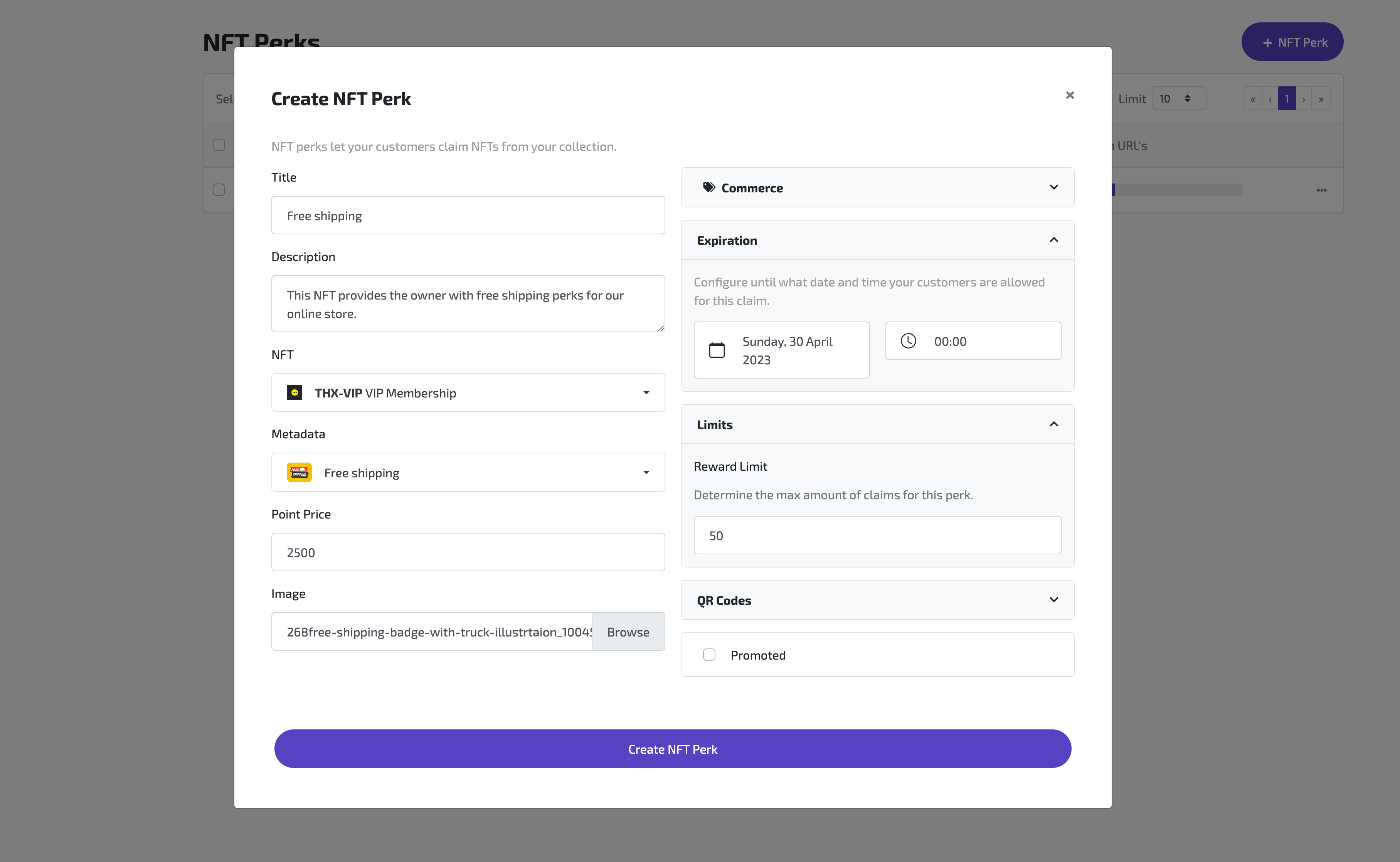
An NFT reward is configured in the dashboard and requires a **title, description** and optionally an **image** to display in the widget user interface.

<figure><img src="https://1499671166-files.gitbook.io/~/files/v0/b/gitbook-x-prod.appspot.com/o/spaces%2Fda0CPvFjFKQsHDL5o9xa%2Fuploads%2FFomG3MakCKBlRL86xXCo%2FScreenshot%202023-04-19%20at%2009.15.41.png?alt=media&amp;token=98c76da2-0a9e-4080-87e6-ad6bfef263e8" alt=""><figcaption></figcaption></figure>

#### NFT

Specify the collection a token should be minted in.&#x20;

#### Metadata

Specify the metadata object in your NFT collection for the token minted upon point redemption. *(Created NFT Collections only)*

**Token**

Specify the token for the specified NFT collection that is owned by your pool and should be transferred upon point redemptions. *(Imported NFT collections only)*

#### Point Price

Specify the amount of points required as payment for the NFT reward. Points will be destroyed upon redemption.

#### Expiration

Specify the expiration date and time for this NFT reward. This force a sense of urgency for your audience. You can always change this field later.

#### Token Gating

Make holding a specific coin balance or NFT a requirement for reward claims. Use this for white listing or building exclusivity in your reward shop.&#x20;

{% content-ref url="/pages/u524pRrmVk9aLJH2A3Uh" %}
[Broken mention](broken://pages/u524pRrmVk9aLJH2A3Uh)
{% endcontent-ref %}

#### Limits

Specify a supply limit for this NFT perk. This force a sense of urgency for your audience when the supply is decreasing fast. You can always change this field later.

{% hint style="info" %}
**Tip:** High supply limits with only a little amount of reward make your reward seem not too popular. You can always introduce a limit after an x amount of claims are done.
{% endhint %}

### Widget appearance

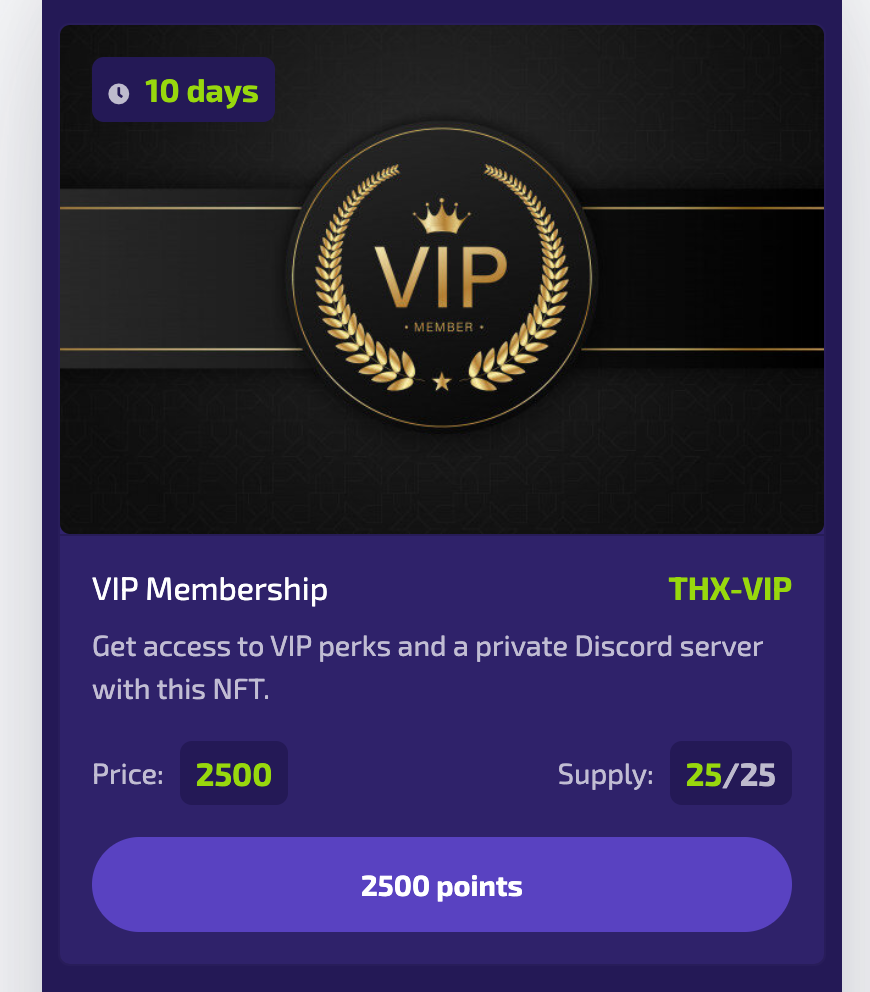
<figure><img src="https://1499671166-files.gitbook.io/~/files/v0/b/gitbook-x-prod.appspot.com/o/spaces%2Fda0CPvFjFKQsHDL5o9xa%2Fuploads%2FihochNraXqB1PbGk9ISe%2FScreenshot%202023-04-19%20at%2020.18.04.png?alt=media&amp;token=d3ae2092-09dc-46c3-be38-37a984ffeeeb" alt=""><figcaption><p>Example of an NFT perk used to create gating mechanisms</p></figcaption></figure>

Users will be able to redeem 2500 points in order to obtain this perk. Optional expiry and supply limits are also visible in this example.&#x20;

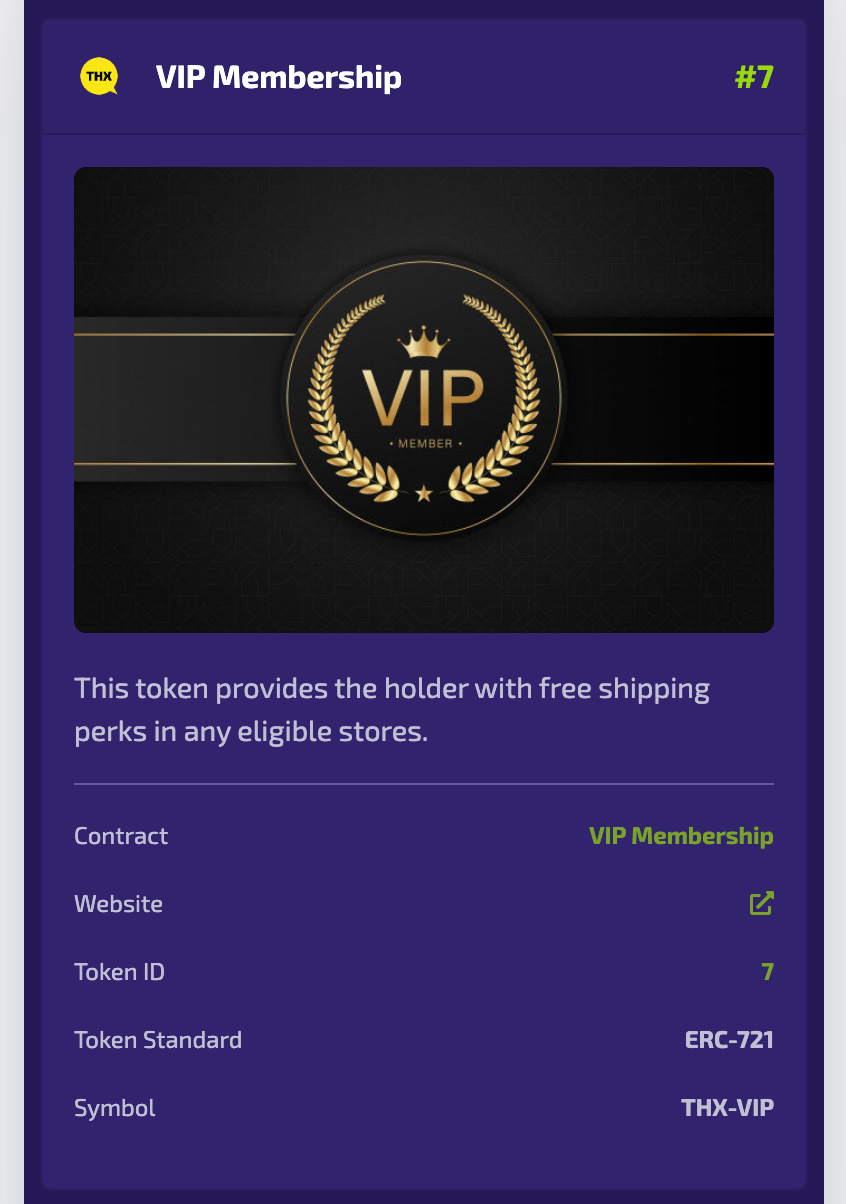
<figure><img src="https://1499671166-files.gitbook.io/~/files/v0/b/gitbook-x-prod.appspot.com/o/spaces%2Fda0CPvFjFKQsHDL5o9xa%2Fuploads%2Fgtabv1343dawHZSHF7sZ%2FScreenshot%202023-04-19%20at%2021.48.38.png?alt=media&amp;token=571f2f52-4400-4e7d-87da-c6a4145188c7" alt=""><figcaption><p>Example of the membership NFT in the user wallet</p></figcaption></figure>

After a redemption this NFT will become visible in the users wallet. Depending on the perk configuration under the hood either a mint or transfer is executed to give the authenticated user ownership over the token.


# Custom Rewards

Use your own webhooks to reward users through code in your application!

### 1. Register a webhook

Implement a public endpoint in your app and monitor the requests we make to it. Make sure to verify requests using the **signing secret** as in the given example. This is what protects the endpoint.

{% content-ref url="/pages/VUQOO7SsxVyCsSCZffOU" %}
[Webhooks](/developers/webhooks)
{% endcontent-ref %}

### 2. Create Custom Reward

Configure a custom reward with optional metadata and we will request your configured endpoint upon point redemption for this reward.

<figure><img src="https://1499671166-files.gitbook.io/~/files/v0/b/gitbook-x-prod.appspot.com/o/spaces%2Fda0CPvFjFKQsHDL5o9xa%2Fuploads%2FsZ5VTxgD9cXDwWapi4N1%2FScreenshot%202023-11-08%20at%2013.49.43.png?alt=media&amp;token=4a954d0e-d02d-4c5f-8953-9fa04e39da18" alt=""><figcaption></figcaption></figure>


# Coupon Rewards

Use coupon rewards for eGift cards, discount codes and Nitro boosts.

You find Coupon Rewards under 'New Reward' on the right hand side of your dashboard.

<figure><img src="https://1499671166-files.gitbook.io/~/files/v0/b/gitbook-x-prod.appspot.com/o/spaces%2Fda0CPvFjFKQsHDL5o9xa%2Fuploads%2FXyg5DCHZ0YYoL349nvtG%2Fimage.png?alt=media&amp;token=4195d3e6-292e-41a6-a17a-dfcef5318068" alt="" width="294"><figcaption></figcaption></figure>

The configuration window gives you several options, including title, description, URL where you can spend the coupon, point price level and nice image to present it in the widget on your front-end. You can promote to reward for additional visibility.&#x20;

The file upload fields allows you to upload the coupon codes in bulk using .CSV format.&#x20;

The **Coupon Codes** tab allows you to view the current codes.

<figure><img src="https://1499671166-files.gitbook.io/~/files/v0/b/gitbook-x-prod.appspot.com/o/spaces%2Fda0CPvFjFKQsHDL5o9xa%2Fuploads%2FTgIhuwFEQMsCthk7Qg3O%2Fimage.png?alt=media&amp;token=c7efc752-4985-4b7a-a26a-368b98205c34" alt=""><figcaption></figcaption></figure>


# Discord Role Rewards

Let your users buy Discord roles using points. A powerful way to reward your community members.

You find Discord Role Rewards under 'New Reward' on the right hand side of your dashboard.

&#x20;![](https://1499671166-files.gitbook.io/~/files/v0/b/gitbook-x-prod.appspot.com/o/spaces%2Fda0CPvFjFKQsHDL5o9xa%2Fuploads%2FheTpQp8cwTIsowgTu4cx%2Fimage.png?alt=media\&token=a474f6be-b83f-4f2a-85bf-2533c6b899c2)

The configuration window gives you several options, including title, description, price of the role and including a nice image to present it in the widget on your front-end. You can promote to reward for additional visibility.&#x20;

<figure><img src="https://1499671166-files.gitbook.io/~/files/v0/b/gitbook-x-prod.appspot.com/o/spaces%2Fda0CPvFjFKQsHDL5o9xa%2Fuploads%2FeRM0Imr89PX045IQ1b2G%2Fimage.png?alt=media&amp;token=f0c52d2a-782e-41e5-963d-71f99e1d1ff9" alt=""><figcaption></figcaption></figure>


# Participants

The Participant Explorer is sorted by rank and provides you with deeper insights into the people that signed in for your campaign.

Participant ranks are calculated as the sum of all points earned with completing quests.

<figure><img src="https://1499671166-files.gitbook.io/~/files/v0/b/gitbook-x-prod.appspot.com/o/spaces%2Fda0CPvFjFKQsHDL5o9xa%2Fuploads%2FKtZCVsk8kSOmO5kDNvCw%2FGroup%2061.png?alt=media&amp;token=2676e9da-386f-4886-af64-623cce153e9b" alt=""><figcaption></figcaption></figure>


# Integrations

Our integrations allow for connecting important channels in your ecosystem to your campaign.

Use THX Discord Bot to increase engagement in your Discord Server and allow users to buy a Discord Role with their points.

{% content-ref url="/pages/lvBQdV3SFOE4ebziR7SX" %}
[Discord](/campaign-managers/integrations/discord)
{% endcontent-ref %}

Use Twitter Automation to automatically publish quests for posts on X that contain a specific hashtag.&#x20;

{% content-ref url="/pages/vDRCZYVzTt9LtwEQz6Se" %}
[Twitter, now X](/campaign-managers/integrations/twitter-now-x)
{% endcontent-ref %}


# Discord

This will guide you through the process of setting up the Discord Bot. This allows for seamless communication between your application and Discord channels, making it easy to automate updates.

### **Invite Bot to server and set up**

Learn how to invite THX Bot and connect it to your campaign using the dashboard.

{% embed url="<https://www.youtube.com/watch?v=Sw0rRjk2EKA>" %}

### **Configure Discord Quest**&#x20;

Learn how to configure the Discord Message quest to reward engagement in particular channels within configured constraints.

{% embed url="<https://www.loom.com/share/465cbcaed9b5468cbd11c6fc406203df>" %}

### **Configure Discord Role Reward**&#x20;

Learn how to configure a Discord Role Reward that campaign participants can purchase with points.

{% embed url="<https://www.loom.com/share/db1fd30c40184f3a8a3d5eb2105ad9e9>" %}


# Twitter, now X

Save time and automate the creation of conditional X rewards and keep your audience entertained with new ways to earn points.

Visit **Integrations** in your campaign settings and provide a **Query** that searches the **past 7 days** of posts every 24 hours of the connected X account by the user. The results can be amplified using 'Repost & Like' quests. Don't forget to publish the quests for desired matches!&#x20;

<figure><img src="https://1499671166-files.gitbook.io/~/files/v0/b/gitbook-x-prod.appspot.com/o/spaces%2Fda0CPvFjFKQsHDL5o9xa%2Fuploads%2FSG68z0EPhwBwoKbQrrzw%2Fdashboard.thx.network_pool_6286444ba9838bc5ed9fe117_integrations_twitter%20(1).png?alt=media&amp;token=f10a8b6d-07c3-4b52-a227-be7d51eb615e" alt=""><figcaption></figcaption></figure>

### Query Previews

Building a Query is very easy, just enter the search parameters on the left and hit 'Preview results' to get a list of matches.&#x20;

<figure><img src="https://1499671166-files.gitbook.io/~/files/v0/b/gitbook-x-prod.appspot.com/o/spaces%2Fda0CPvFjFKQsHDL5o9xa%2Fuploads%2FTaYZvQJXAlAaZDoW0iga%2Fdashboard.thx.network_pool_6286444ba9838bc5ed9fe117_integrations_twitter.png?alt=media&amp;token=28241e3b-d411-4dd7-8109-6fea1a4eaa7e" alt=""><figcaption></figcaption></figure>


# Gitcoin Passport

Privacy respecting proof of humanity and reputation. Fights bots and spam.

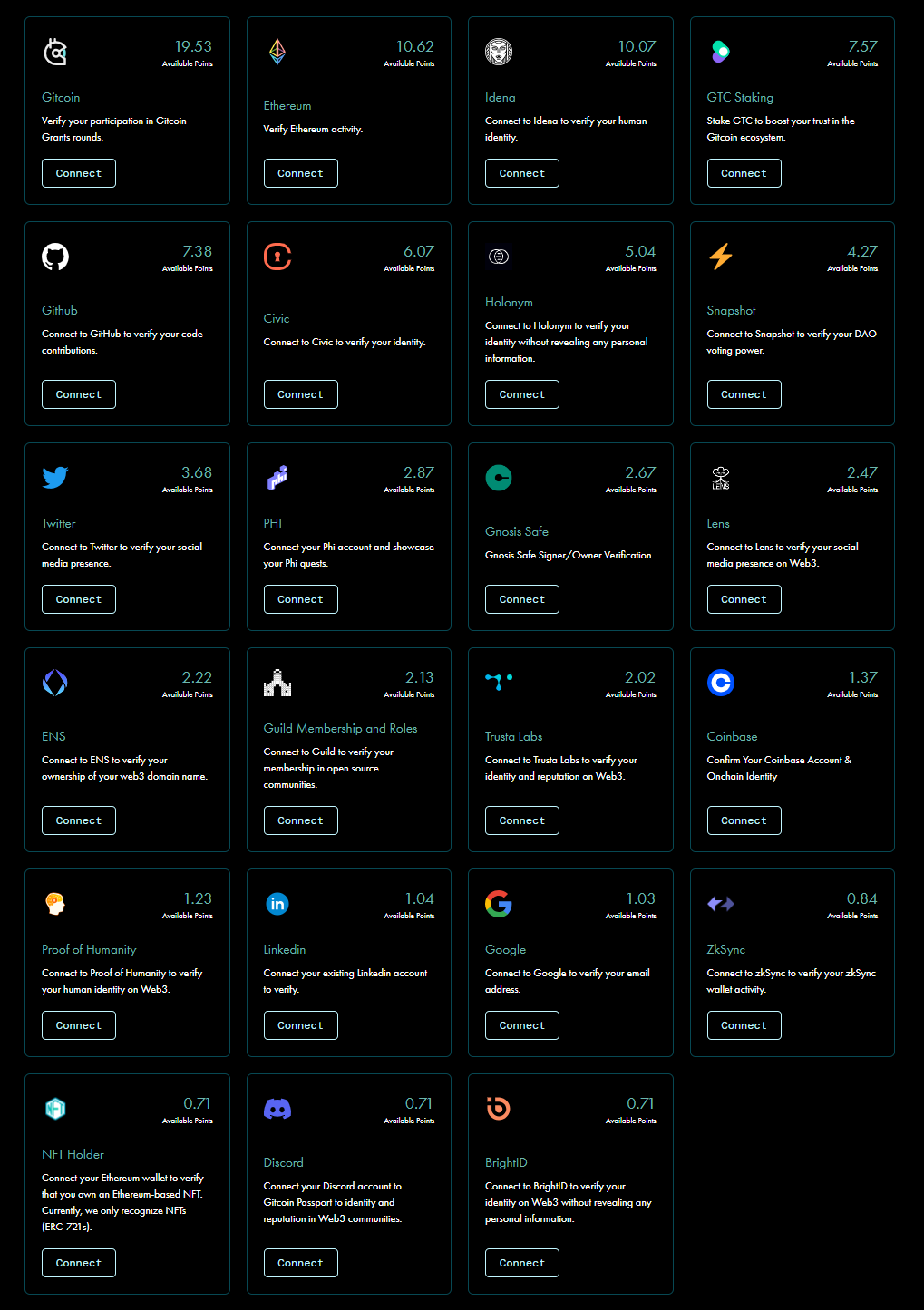
### 23 verification methods and counting

You can provide your users with over 23 methods to verify that their account is not a bot. The more accounts a user links, the higher their score. Read more about Gitcoin Passport at <https://passport.gitcoin.co/>

<figure><img src="https://1499671166-files.gitbook.io/~/files/v0/b/gitbook-x-prod.appspot.com/o/spaces%2Fda0CPvFjFKQsHDL5o9xa%2Fuploads%2FHob0rIvg5y4yOoH2FsvZ%2Fimage.png?alt=media&amp;token=d4e7c461-cda7-4cc0-869d-9a20cb1402bf" alt=""><figcaption></figcaption></figure>

### Setting up Gitcoin Passport

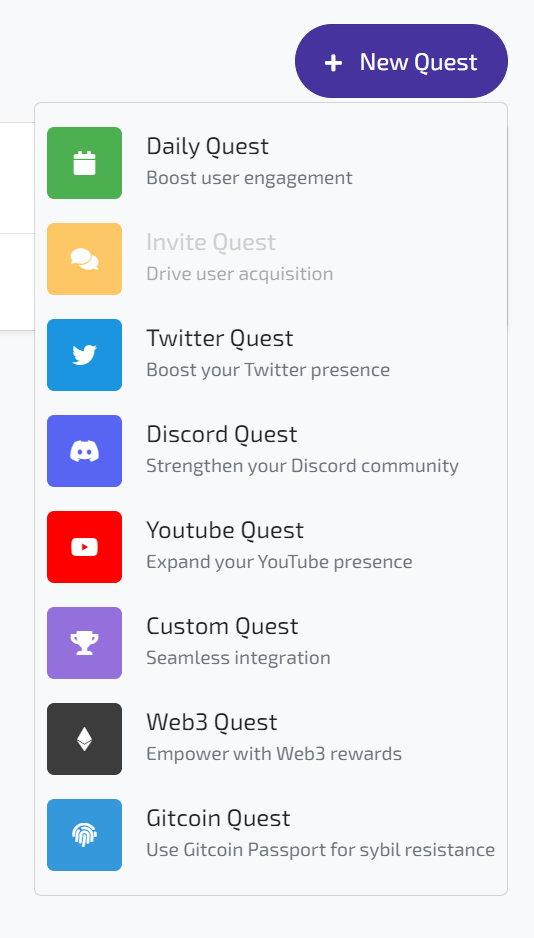
You find Gitcoin Quests under 'New Quest' on the right hand side of your dashboard.&#x20;

<figure><img src="https://1499671166-files.gitbook.io/~/files/v0/b/gitbook-x-prod.appspot.com/o/spaces%2Fda0CPvFjFKQsHDL5o9xa%2Fuploads%2Fi9EF0YXH8KV1O45r5yv1%2Fimage.png?alt=media&amp;token=847dfd2b-d401-44a8-a9d5-5fb26dea2c9f" alt="" width="267"><figcaption></figcaption></figure>

Set an requirement to have a Gitcoin Passport score between 0 and 100 points.

<figure><img src="https://1499671166-files.gitbook.io/~/files/v0/b/gitbook-x-prod.appspot.com/o/spaces%2Fda0CPvFjFKQsHDL5o9xa%2Fuploads%2Fa2HTpxT5wqYmLXyHj0LK%2Fimage.png?alt=media&amp;token=3f1b5002-f40c-4731-8275-737bd50fab74" alt=""><figcaption></figcaption></figure>

### Set up Quest Locks

Lock certain high-value quests with the requirement to complete the Gitcoin Passport quest. Effectively you just guarded your guests against bots! Read more about Quest Locks in general below.

{% content-ref url="/pages/3iQfFjXHcnZEmFChsduJ" %}
[Quest Locks](/campaign-managers/quests/quest-locks)
{% endcontent-ref %}

<figure><img src="https://1499671166-files.gitbook.io/~/files/v0/b/gitbook-x-prod.appspot.com/o/spaces%2Fda0CPvFjFKQsHDL5o9xa%2Fuploads%2FeRgzgPJQbADJ3B9xQovk%2Fimage.png?alt=media&amp;token=68e827ee-b8bd-47a9-b661-8329ec1c10b9" alt="" width="403"><figcaption></figcaption></figure>

### End Result for Users

Users see the Gitcoin Passport quests displayed in the widget or on the campaign pages.

<figure><img src="https://1499671166-files.gitbook.io/~/files/v0/b/gitbook-x-prod.appspot.com/o/spaces%2Fda0CPvFjFKQsHDL5o9xa%2Fuploads%2FVMhjc8j1BwxF7mjWz5o1%2Fimage.png?alt=media&amp;token=a881a26f-044d-4efa-b1b2-52a661d8c012" alt="" width="563"><figcaption><p>A Gitcoin Passport quests as offered to the user in the widget.</p></figcaption></figure>


# Coins

This page demonstrates how to configure and deploy a ERC-20 token smart contract on the Polygon blockchain.

The Dashboard offers various token standards to create with an intuitive interface. All tokens adhere as much to their technical standards as possible, therefore allowing other software like Wallets or Exchanges to potentially build upon your smart contracts.

{% hint style="warning" %}
**Note: Note:** We believe that **standardization** and **open infrastructure** are biggest advantages blockchain technology has brought over the years.
{% endhint %}

<figure><img src="https://1499671166-files.gitbook.io/~/files/v0/b/gitbook-x-prod.appspot.com/o/spaces%2Fda0CPvFjFKQsHDL5o9xa%2Fuploads%2Fr4nPklAyeE8YvkL12QIr%2Fcoin-dashboard.png?alt=media&amp;token=73178214-9e4b-4b73-bef2-ce4a4b3ab311" alt=""><figcaption><p>Dashboard screen to create or import coins with the $THX token on Polygon as an example.</p></figcaption></figure>

## Token Configuration

Click on the prominent "Create Token" button in the header to access the configuration modal. Here, you will choose your token variant and provide details about the token you're about to create.

![Configuration modal for an Unlimited Supply Token.](https://1499671166-files.gitbook.io/~/files/v0/b/gitbook-x-prod.appspot.com/o/spaces%2Fda0CPvFjFKQsHDL5o9xa%2Fuploads%2FEfAn58LFB88pzOZecle0%2Fimage.png?alt=media\&token=957d95a8-8d90-4a4f-81f9-a1846635cea4)

#### Blockchain Network

You are asked to choose the blockchain network you want to deploy your token contract on. Read more about the options on the Blockchains page.

{% content-ref url="/pages/ybAbhO0KIToTQQ3vwt8w" %}
[Broken mention](broken://pages/ybAbhO0KIToTQQ3vwt8w)
{% endcontent-ref %}

#### Variant

Next you choose your token variant. Read more about variants to the ERC-20 token contract standard over here. Depending on the variant you choose you will be asked to provide information about your tokens **total supply.**&#x20;

#### 1. Limited Supply Tokens

Limited Supply Tokens have a fixed **total supply** property configured in their contract. A token with a fixed total supply might gain in value since it could be considered a scarce asset.&#x20;

**Total Supply**

Setting a total supply might seem difficult, but sometimes shouldn't be too complex. The fact that 1 unit of your token could be divided up to **18 decimals** will allow you to configure very small amounts and still send millions of rewards from a pool balance of 1:sweat\_smile:

{% hint style="info" %}
**Tip:** In our experience your reward configuration dictates the distribution of your token which should relate to its total supply.
{% endhint %}

#### 2. Unlimited Supply Tokens

When we talk about engagement tokens we usually talk about Unlimited Supply Tokens. These tokens don't have a minted total supply, but will mint new tokens whenever transfers occur.

The total supply will start at 0, grow over time and you will never have to worry about making deposits to your pool as long as your pool is allowed to mint your token.

Both Limited and Unlimited Supply Tokens could be used for **making payments**, **exchanging value**, **point systems** and **reputation metrics**.

#### **Name**

Choose a name for your token. This field is limited to 50 characters and should in the best case describe the software or brand the token is embedded in.

#### Symbol

Choose a symbol for your token. Keep it short and catchy, but simple and recognisable. There are no best practices, but usually a token symbol is an abbreviated sequence of 3 to 6 characters like stock tickers in traditional exchange interfaces.

The symbol field is also part of the ERC-20 standard.

#### **Total Supply** (Limited Supply Tokens only)

Choose how many of your token should be minted upon creation. The minted tokens will move to your **Treasury** which is a wallet we manage internally.

When creating a pool you will be able to top it up with tokens from this treasury.

{% hint style="info" %}
**Note:** All token contracts created through the Dashboard are configured to be fractioned up to 18 decimals.&#x20;
{% endhint %}

After providing all the details you can hit the **Create Token** button and after a few seconds your ERC-20 smart contract has been deployed to the blockchain network of your choice and you should see a card with information about your token.

![An overview of your deployed ERC-20 tokens.](https://1499671166-files.gitbook.io/~/files/v0/b/gitbook-x-prod.appspot.com/o/spaces%2Fda0CPvFjFKQsHDL5o9xa%2Fuploads%2FnHTawoqnOC58jmihR12m%2Fimage.png?alt=media\&token=92a8bfef-27ab-43c5-8a01-a7bc6087162e)

Clicking the card will redirect you to the blockchain networks block explorer. This is the place where you can inspect all on-chain interactions with to your token contract.

![The AMT token page on polygonscan.com](https://1499671166-files.gitbook.io/~/files/v0/b/gitbook-x-prod.appspot.com/o/spaces%2Fda0CPvFjFKQsHDL5o9xa%2Fuploads%2FLa9uB8B2kgnF7iFqboO6%2Fimage.png?alt=media\&token=457a8342-d211-44e8-9b2f-d902828e19fe)

**Congratulations!**:partying\_face: You have deployed your first ERC-20 token smart contract using THX infrastructure **without breaking your brain**:brain: **or bank**:bank:**!**&#x20;


# NFT

This page demonstrates how to create an NFT collection and mint tokens from a pool. For a video guide, scroll down to the bottom of this page.

Next to [ERC-20](https://eips.ethereum.org/EIPS/eip-20) tokens (coins) it is also possible to create and import tokens based on the [ERC-721 ](https://eips.ethereum.org/EIPS/eip-721)or [ERC-1155](https://eips.ethereum.org/EIPS/eip-1155) standard in the Dashboard. This type of token contract is widely known as an **NFT**.

{% hint style="info" %}
**Info:** Non Fungible Tokens are unique in their sort and differ in that aspect from the Fungible Tokens, which are all equal and therefor function well as forms of payment.
{% endhint %}

### Import NFT

Navigate to Contracts -> NFT and you will able to click the **Import NFT** button. This will open up a modal where you can start the import flowfor NFT contracts based on the ERC721 or ERC1155 standard.

Our system will import all tokens owned by the campaign contract for the contract address you provide, so you can create NFT Perks for these tokens. You will find your campaign contract address on the campaigns overview page.

{% hint style="warning" %}
**Note:** Make sure to transfer ownership of your tokens to the campaign contract prior to importing a collection or it will throw a 404 error.&#x20;
{% endhint %}

<figure><img src="https://1499671166-files.gitbook.io/~/files/v0/b/gitbook-x-prod.appspot.com/o/spaces%2Fda0CPvFjFKQsHDL5o9xa%2Fuploads%2FZzHIUHco8mjHfU5iotTS%2FScreenshot%202023-04-18%20at%2009.17.48.png?alt=media&amp;token=1bffb7e1-2651-4e40-b9bd-6606e3c000e3" alt=""><figcaption></figcaption></figure>

### Create NFT

Navigate to Contracts -> NFT and you will able to click the **Create NFT** button. This will open up a modal where you can start the configuration of your NFT contract based on the ERC721 standard.

<figure><img src="https://1499671166-files.gitbook.io/~/files/v0/b/gitbook-x-prod.appspot.com/o/spaces%2Fda0CPvFjFKQsHDL5o9xa%2Fuploads%2FzgYU3UWfwUQYzAG3iguD%2FScreenshot%202023-04-18%20at%2009.08.54.png?alt=media&amp;token=f06b3a21-4167-4698-9f09-a46e0fd75e6e" alt=""><figcaption><p>Example of NFT Create modal in dashboard</p></figcaption></figure>

#### **Title**

Choose a name for your token. This field is limited to 50 characters and should in the best case describe what kind of tokens are in your NFT collection.

#### Symbol

Choose a symbol for your token. Keep it short and catchy, but simple and recognisable. There are no best practices, but usually a token symbol is an abbreviated sequence of 3 to 6 characters like stock tickers in traditional exchange interfaces.

#### Description

Provide a brief description of your NFT collection. We will use this in places where we need to provide more info about your NFT.

#### Icon image

This image will show as a thumbnail for your collection in for example token overviews.

## Create an NFT - Video Guide

{% embed url="<https://www.youtube.com/watch?ab_channel=THXNetwork&v=QynGXWP94zk>" %}
Part 1/3 of the NFT creation video guide. For part 2, see [Broken mention](broken://pages/zKIItxZyNrB3DS2Dbl3v)
{% endembed %}


# Memberships (Free)

Should you choose to exit, simply wait for the lock period to end to reclaim your tokens!

By locking a minimum of $5 worth of $THX, you immediately become a THX Member and unlock a plethora of benefits:

💰 Earn double digit APR on locked tokens, including protocol fees.\
🔓 Access unique quests and exclusive rewards, such as the lottery.\
✅ Vote in governance decisions to influence network fees and more.\
🪂 Lock tokens for increased chances at exclusive quests and airdrops.

## How-to get your THX Membership

1\) Head over to the [**THX Membership Dashboard**](https://app.thx.network/)\
2\) Create your membership by locking $5 USDC.e or approximately 500 $THX

{% embed url="<https://youtu.be/MqMfwzpkmW4>" %}

## Memberships Tiers

🏅 Membership Levels - Climbing to the next membership level and earning your Discord role is the name of the game. Just lock in your tokens to unlock higher tiers. And should you choose to exit, simply wait for the lock period to end to reclaim your tokens!

* Rookie: Lock \~$5 worth of THX
* Pro: Lock \~$50 worth of THX
* Elite: Lock \~$500 worth of THX
* Master: Lock \~$5,000 worth of THX
* Legend: Lock \~$50,000 worth of THX

## Withdraw your $veTHX locked tokens

To withdraw your locked tokens, click 'Withdraw' on app.thx.network and accept the penalty.

## Secured and Backed by the Best

##

THX Network's [staking and lock system](/tokenomics/locking-usdthx-to-usdvethx) is built using Balancer smart contract technology. Balancer has [completed full audits](https://docs.balancer.fi/reference/contracts/security.html) with Certora, OpenZeppelin, Trail of Bits, and ABKD.

### Bug Bounty <a href="#bug-bounty" id="bug-bounty"></a>

Balancer's bug bounty program is [among the largest in DeFi](https://immunefi.com/explore/?sort=reward%3Adesc) with a maximum payout of **1,000 ETH** for critical vulnerabilities. For more info of Balancer's Bug Bounty program, visit their [Immunefi page](https://immunefi.com/bounty/balancer/).

### Investors <a href="#bug-bounty" id="bug-bounty"></a>

&#x20;THX Network is  backed by a strong set of European and global investors and accelerators.&#x20;

<figure><picture><source srcset="/files/PoqYmdqwSfishXUaEM24" media="(prefers-color-scheme: dark)"><img src="https://1499671166-files.gitbook.io/~/files/v0/b/gitbook-x-prod.appspot.com/o/spaces%2Fda0CPvFjFKQsHDL5o9xa%2Fuploads%2FoOYozPvu1jnQOZCiXjXW%2FTechstars_Logo_Primary_Black.png?alt=media&amp;token=2c8578a5-c08c-4930-91d3-7972f89678cc" alt="" width="375"></picture><figcaption><p><strong>THX Network is backed by Techstars, one of the largest pre-seed investors in the world, 2022 cohort.</strong></p></figcaption></figure>

<figure><img src="https://1499671166-files.gitbook.io/~/files/v0/b/gitbook-x-prod.appspot.com/o/spaces%2Fda0CPvFjFKQsHDL5o9xa%2Fuploads%2FgAS1kPCa85iaW7SVYrPr%2Fimage.png?alt=media&amp;token=8f4faa5e-ca53-4d5b-93e3-4be39826d7e2" alt="" width="178"><figcaption><p><strong>THX Network has received funding from the European Union under agreement 82888 (Blockpool) and 824509 (Block.IS)</strong></p></figcaption></figure>

<br>


# Lottery (Free)

Starting today, THX Network is using lottery rewards to distribute benefits! This makes rewards more accessible and exciting for everyone. Lock just $5 in $THX to join and win awesome prizes. You get the locked tokens back after lock period expires.&#x20;

Join now and take advantage of the **FREE** THX memberships!

#### Tickets

We allocate \~80% of the available tickets to registered members, while the remaining \~20% are accessible to users who successfully complete any quest on THX Network’s platform.&#x20;

### How-to

How to acquire tickets to participate in the rewards lottery? Check this step-by-step guide below.

1. Go to [**app.thx.network/learn**](https://app.thx.network/learn)
2. Sign in using an email or a wallet.

<figure><img src="https://1499671166-files.gitbook.io/~/files/v0/b/gitbook-x-prod.appspot.com/o/spaces%2Fda0CPvFjFKQsHDL5o9xa%2Fuploads%2FdKaWt3qaBAOabGb498C2%2FCaptura%20de%20Pantalla%202024-05-14%20a%20la(s)%2019.17.52.png?alt=media&amp;token=5290ccf5-6f8b-44d1-b00f-c4120e6d53f7" alt=""><figcaption></figcaption></figure>

3. Complete the quests found on the page. You'll find instructions on how to complete them in their descriptions.

<figure><img src="https://1499671166-files.gitbook.io/~/files/v0/b/gitbook-x-prod.appspot.com/o/spaces%2Fda0CPvFjFKQsHDL5o9xa%2Fuploads%2FoeTjZN0tzsr1GzuNHbj9%2FCaptura%20de%20Pantalla%202024-05-14%20a%20la(s)%2019.18.04.png?alt=media&amp;token=b6066333-11d2-4e0e-8d0d-82695672c266" alt=""><figcaption></figcaption></figure>

4. To claim lottery tickets, you have two options:

1\) The first option is to complete social tasks and purchase rewards in the THX Network app. For this, you need to reach 1000 points. There are only 30 rewards enabled for these users.

2\) The second option is to acquire a membership, which allows you to claim your lottery tickets for only 500 points if you have a Rookie membership or for 250 points if you have a Pro membership tier or higher. There are 100 tickets available for Rookie members and an additional 30 tickets for Pro members and above.

There is a limit of 1 ticket for those who do not have any membership, 2 tickets for those who have a Rookie membership, and 4 tickets for those who have a Pro membership or higher (they can claim tickets corresponding to both the Rookie and Pro memberships)

&#x20;To create a membership, head to these guides, where you'll find more information:

{% embed url="<https://docs.thx.network/faq/memberships>" %}

{% embed url="<https://docs.thx.network/tokenomics/usdvethx-and-staking>" %}

<figure><img src="https://1499671166-files.gitbook.io/~/files/v0/b/gitbook-x-prod.appspot.com/o/spaces%2Fda0CPvFjFKQsHDL5o9xa%2Fuploads%2FdTjHk2jB8lF4GQcVPB9i%2FCaptura%20de%20Pantalla%202024-05-14%20a%20la(s)%2019.18.19.png?alt=media&amp;token=4b5a3b9d-324f-4fc8-b8b5-4ecd06df5992" alt=""><figcaption></figcaption></figure>

<figure><img src="https://1499671166-files.gitbook.io/~/files/v0/b/gitbook-x-prod.appspot.com/o/spaces%2Fda0CPvFjFKQsHDL5o9xa%2Fuploads%2FWuS2h6uciAyvHF7pUkeh%2FCaptura%20de%20Pantalla%202024-05-14%20a%20la(s)%2019.18.27.png?alt=media&amp;token=ea33d5c6-9598-4a74-98aa-a34730437635" alt=""><figcaption></figcaption></figure>

5. When claiming the reward, you a code will be assigned to your THX NetworK ID, which will be used in the lottery. Once all rewards have been claimed, we will conduct the first draw, where we will raffle the prizes. These prizes will be distributed to the wallets associated with THX Network that made the respective claims.

<figure><img src="https://1499671166-files.gitbook.io/~/files/v0/b/gitbook-x-prod.appspot.com/o/spaces%2Fda0CPvFjFKQsHDL5o9xa%2Fuploads%2FWJkSPmSVKKTHUQyWaQDn%2FCaptura%20de%20Pantalla%202024-05-14%20a%20la(s)%2019.18.34.png?alt=media&amp;token=e84e6122-6941-4139-bd74-1d2314a73541" alt=""><figcaption></figcaption></figure>


# Pricing

{% hint style="info" %}
**Info:** You can find detailed information about pricing plans on [our pricing page](https://thx.network/pricing).&#x20;
{% endhint %}

### Payments <a href="#payments" id="payments"></a>

The monthly fee covers gas costs. We accept EUR, USD and crypto payments. In all cases you receive a monthly invoice. You have the following options for payments.

#### EUR <a href="#eur" id="eur"></a>

You receive an invoice which includes payment options through wire (IBAN), iDEAL/Bancontact/SOFORT, Apple Pay en Google Pay and credit card.

#### USD <a href="#usd" id="usd"></a>

You receive an invoice with a payment option by credit card, Apple Pay en Google Pay and wire (IBAN).

#### Crypto (ETH, MATIC, USDC and EURe) <a href="#crypto-eth-matic-usdc-and-eurs-jeur-ageur" id="crypto-eth-matic-usdc-and-eurs-jeur-ageur"></a>

We’re launching our payment gateway soon. For now complete your payment by depositing into one of the addresses below and send us an email on <info@thx.network.> Within one working day your pool will be activated.

```
 0x0b8e0aAF940cc99EDA5DA5Ab0a8d6Ed798eDc08A ( Polygon )
 0xB4a3dbF1Dca58B157B2Cb27d28Aba4BB1Ca3D223 ( Ethereum )
 0x140e7364eE4E29a677a9d6cCF26ac945e7E80B65 ( BNB Chain )
```


# Multi Wallet Account

Set up your account to support multiple wallets. WalletConnect v2 is now used for a mobile friendly login experience.

This allows you to connect multiple wallets to your THX account using WalletConnect. When purchasing Coin or NFT rewards you will be asked which wallet should receive the reward.

Step 1) In the upper right corner, select 'New Wallet'

<figure><img src="https://1499671166-files.gitbook.io/~/files/v0/b/gitbook-x-prod.appspot.com/o/spaces%2Fda0CPvFjFKQsHDL5o9xa%2Fuploads%2FiMygxz8ZfDobn4YpbkDG%2Fimage.png?alt=media&amp;token=b8a4e7c2-293e-4235-b078-c2ae541e84cf" alt=""><figcaption></figcaption></figure>

2\) Add your own wallet using WalletConnect

<figure><img src="https://1499671166-files.gitbook.io/~/files/v0/b/gitbook-x-prod.appspot.com/o/spaces%2Fda0CPvFjFKQsHDL5o9xa%2Fuploads%2F0pnB2F4Qo9776iXyfJpW%2Fimage.png?alt=media&amp;token=80d37d81-5f19-4c89-8f35-8c912000b5b4" alt=""><figcaption></figcaption></figure>

<figure><img src="https://1499671166-files.gitbook.io/~/files/v0/b/gitbook-x-prod.appspot.com/o/spaces%2Fda0CPvFjFKQsHDL5o9xa%2Fuploads%2FhmC0XXssrttw8Kd596iU%2Fimage.png?alt=media&amp;token=3f962f1e-213c-4653-b6f4-b88d86f859fa" alt=""><figcaption></figcaption></figure>

3\) Done! When you claim a on-chain reward you can now choose between recieving it in your THX Network Safe based wallet, or one of your connected wallets.

<figure><img src="https://1499671166-files.gitbook.io/~/files/v0/b/gitbook-x-prod.appspot.com/o/spaces%2Fda0CPvFjFKQsHDL5o9xa%2Fuploads%2FSpyOgaK6Dg6Gx2JTXxU3%2Fimage.png?alt=media&amp;token=25e36125-d31b-48c5-9249-9cb9a652bed4" alt=""><figcaption></figcaption></figure>


# Points

TLDR; people earn points by completing quests. Point can be spent on rewards.

Points are an important foundation for your quest and reward campaign. People earn points for completing quests.  The points get displayed at the top of their wallet when logged in.

Using points you can build all kinds of exciting engagement campaigns:\
\
\- let users earn points for potential airdrops\
\- let users compete in leaderboard rankings\
\- let users buy rewards during the whole lifetime of the campaign\
\
And because you have the option to exchange points for on-chain assets and other rewards instantly, the points are more tangible than in most point campaigns. Note that points are optional for quests! The possibilities are endless!

<figure><img src="https://1499671166-files.gitbook.io/~/files/v0/b/gitbook-x-prod.appspot.com/o/spaces%2Fda0CPvFjFKQsHDL5o9xa%2Fuploads%2F9OFMIWQ3rAmdjtW9J9Fd%2Fimage.png?alt=media&amp;token=69f0cd51-ff0d-44a2-bbe5-a58194ccb33d" alt="" width="375"><figcaption><p>Logged out view of quests, notice the point values on the right hand side.</p></figcaption></figure>


# Other

Frequently Asked Questions about our product and a few general ones about blockchain and, cryptocurrencies.

If your question wasn’t answered, reach out on our [Discord server](https://discord.com/invite/u3DruB5pm5), [Telegram channel](https://t.me/thxnetwork) or find more ways to get in touch with us on [our website](https://thx.network/contact).

### **Product Questions**

#### **Q. How do I add a chain wallet?**

Follow the [Multi Wallet Account](/faq/multi-wallet-account) guide to add wallets.

#### **Q. I want to buy the THX bot. Can I get any tutorial videos on how to set it up on Discord?**

Start by logging in on [dashboard.thx.network](https://dashboard.thx.network/) and go to the campaign's integrations section. Follow [our Discord guide and screencast](/campaign-managers/integrations/discord).&#x20;

#### **Q. I can’t complete or get points for the Twitter follow. I synced my account and followed already, but it’s saying I can’t earn them for some reason.**

Check if you have the required number of followers mentioned in the campaign.

#### **Q. Getting an error on X campaign**

Check if the original post on X is removed. If so, reach out to the campaign manager of the respective campaign.

#### **Q. I wasn't able to see YouTube quests.**

You may have created another account using your Discord account or connected it to a different THX account.

#### **Q. Can we merge two email accounts into one?**

No.

#### **Q. I would like to transfer my rewards to my account with Metamask. How should I do it? If I try to connect with Metamask, it resets all my points. How can I transfer them?**

You cannot transfer points (as they are only valid for that account). We do not allow account point transfers between different accounts to prevent people from creating multiple accounts and transferring their points, which could be a way to game the system. Only the redeemed rewards are transferable, so you'd have to redeem those points for something and transfer the item/token/NFT.

#### **Q. I'm having an issue with connecting to Discord. It's saying I am connected to another account.**

You might have logged in using Discord, which automatically connects that Discord to a THX account. If that account does not hold any quest history or tokens, it should be safe to remove it, and you will be able to connect your Discord afterward.

#### **Q. Connect Metamask with Discord accounts?**

Log in with your Metamask, then open the menu, go to Account -> Connected, and disconnect the account you'd like to disconnect. This should allow you to connect it to your other accounts.

#### **Q. How do I see my private key address?**

This is a smart contract wallet address; there is no private key for it.

#### **Q. I can't seem to sign in to THX Network through my Metamask wallet.**

Metamask Mobile Browser on Android devices does not support our current authentication flow as it redirects between subdomains and removes the required cookies. We're in the process of deprecating this login method and will allow users to connect one or more Metamask/WalletConnect wallets to THX accounts instead.

### **General Questions**

<details>

<summary>How sybil resistant are conditional rewards?</summary>

Conditional rewards can only be claimed once per platform user ID, meaning that if you have the same Twitter account connected to multiple THX accounts, only one of these accounts will be eligible for claiming the conditional reward.

When a user claims a conditional rewards we ask the user to connect their external platform account so we can validate the expected user behaviour through the platform API's on behalf of the connected user.

</details>

<details>

<summary><strong>How eco-friendly are tokens?</strong></summary>

Very good question! You’ve surely heard about the massive amounts of energy that some blockchain projects use.&#x20;

THX Network is worried about this as well, which is why we’re building on the Polygon sidechain, which is the [eco-friendly blockchain](https://blog.polygon.technology/polygon-the-eco-friendly-blockchain-scaling-ethereum-bbdd52201ad/) that’s scaling Ethereum. Learn more about [Polygon](https://blog.polygon.technology/polygon-the-eco-friendly-blockchain-scaling-ethereum-bbdd52201ad/) and [THX Network’s efforts of being a carbon positive company.](https://offsetra.com/profile/THX_Network)

</details>

### **Blockchain & Crypto Basics**

<details>

<summary>I’ve heard about blockchain, but what is it exactly?</summary>

A blockchain is a public database that is updated and shared across many computers in a network. "Block" refers to data and state being stored in consecutive groups known as "blocks". "Chain" refers to the fact that each block cryptographically references its parent. In other words, blocks get chained together. The data in a block cannot change without changing all subsequent blocks, which would require the consensus of the entire network. For more information, check out the public resources provided by the [Ethereum blockchain](https://ethereum.org/en/developers/docs/intro-to-ethereum/#what-is-a-blockchain).

</details>

<details>

<summary>What is cryptocurrency?</summary>

A cryptocurrency is a digital or virtual currency that is secured by cryptography, which makes it nearly impossible to counterfeit or double-spend. Well known crypto currencies are Bitcoin and Ethereum. A defining feature of cryptocurrencies is that they are generally not issued by any central authority, rendering them theoretically immune to government interference or manipulation.

</details>

<details>

<summary>What is a crypto wallet? Do I need to have one already?</summary>

Crypto wallets store your private keys (similar to a password), keeping your tokens safe and accessible. They also allow you to send, receive, and spend cryptocurrencies like Bitcoin and Ethereum. Wallet management is a crucial part of web3, that a lot of web2 users don’t have experience with.&#x20;

That’s why THX Network manages users’ wallets for them, in a very secure way. When users claim rewards for the first time, a wallet will be automatically created. Users only need to remember a traditional e-mail & password combination or login through Single Sign On to access their wallet.

</details>

####


# HTML Widget

Your campaign widget exposes various functionality to your site in order to create seamless onboarding experiences.

<figure><img src="https://1499671166-files.gitbook.io/~/files/v0/b/gitbook-x-prod.appspot.com/o/spaces%2Fda0CPvFjFKQsHDL5o9xa%2Fuploads%2FxGaWMQGVNwngpBjTr84p%2FScreenshot%202023-12-21%20at%2013.53.33.png?alt=media&amp;token=69c71dc9-9c00-4a35-969c-cb38a7aaf66f" alt=""><figcaption><p>Example of widget configuration in Developer -> General</p></figcaption></figure>

### 1. Load Campaign Widget

You can embed the campaign widget on your website using a personal embed script or using our JS SDK.&#x20;

### 1.1. Personal embed script

Inject the campaign widget in your site using a script tag similar to this. You'll find your script in the Developer -> General section of your campaign.

```markup
<script src="https://api.thx.network/v1/widget/507f191e810c19729de860ea.js"></script>
```

### 1.2. JS SDK

```javascript
const { THXWidget } = require('@thxnetwork/sdk');

THXWidget.create({ campaignId: '507f191e810c19729de860ea' })
```

### 2. Widget Functions

Some interactions with the campaign widget are exposed to the parent window and you can invoke them as described below.

```typescript
// Will show the widget
window.THXWidget.show(true);
// Will hide the widget
window.THXWidget.show(false);

// Will navigate inside the widget to different routes
window.THXWidget.open("/quests");
window.THXWidget.open("/rewards");
window.THXWidget.open("/wallet");

window.THXWidget.signin() // Sign in (Popup on large screens, redirect on small screens)
window.THXWidget.signout() // Sign out:)

// Will show the widget and open the virtual wallet connect view
window.THXWidget.connect("a6021617-9aab-4194-b2af-a4dd0cc96f84");
// Will store the Identity and connect to an account after a sign in
window.THXWidget.setIdentity("a6021617-9aab-4194-b2af-a4dd0cc96f84");

// public var updated by widget app
// null (signed out), false (signing in), true (signed in)
window.THXWidget.isAuthenticated
```


# JS SDK

Created Identities and register Events in your application using \`THXAPIClient\` or rebuild the campaign widget in your own environment using \`THXBrowserClient\`.

{% embed url="<https://www.npmjs.com/package/@thxnetwork/sdk>" %}
Download @thxnetwork/sdk on NPM
{% endembed %}

The SDK allows for an easy implementation of THX API in both browsers and JavaScript backends. Make sure to obtain your API credentials in your campaign dashboard.

<figure><img src="https://1499671166-files.gitbook.io/~/files/v0/b/gitbook-x-prod.appspot.com/o/spaces%2Fda0CPvFjFKQsHDL5o9xa%2Fuploads%2F8LjqcEv4eQBkhXVRgozU%2FScreenshot%202024-08-01%20at%2015.15.38.png?alt=media&amp;token=0bc5a94d-3058-4188-92fd-524f258fe1a3" alt=""><figcaption><p>Example of API keys under Account -> Developer -> API</p></figcaption></figure>

### THXAPIClient

```javascript
const { THXAPIClient } = require('@thxnetwork/sdk');

const thx = new THXAPIClient({
    apiKey: '',
});
```

#### Create Identity

Identities are unique codes that you can use to allocate event data to. After connecting the Identity to a THX account your users will be able to complete custom quests for this event data.

```javascript
const identity = await thx.identity.create()
// a6021617-9aab-4194-b2af-a4dd0cc96f84
```

{% content-ref url="/pages/iB5RZgY2ptgY6L6x4zzZ" %}
[Identity](/developers/js-sdk/identity)
{% endcontent-ref %}

{% content-ref url="/pages/L8cdBcKnoinBtHSZ1Puh" %}
[Events](/developers/js-sdk/events)
{% endcontent-ref %}


# Identity

Use an Identity to assign Events in your system to THX users and build quests around it.  Learn how to connect an Identity to a THX account using your campaign widget.

<figure><img src="https://1499671166-files.gitbook.io/~/files/v0/b/gitbook-x-prod.appspot.com/o/spaces%2Fda0CPvFjFKQsHDL5o9xa%2Fuploads%2FmSJFPRP4UhISX76G45Ei%2FScreenshot%202023-12-21%20at%2013.53.17.png?alt=media&amp;token=18ed764f-cc42-490d-ad11-a11d5cc2f382" alt=""><figcaption><p>Example of Identities in Developer -> Identity</p></figcaption></figure>

### 1. Create Identity

Create a Identity for your user and store it in your your databases user collection.

```javascript
const { THXAPIClient } = require('@thxnetwork/sdk');

const thx = new THXAPIClient({
    apiKey: '',
});

const identity = await thx.identity.create();
// e7f32a71-33ea-418e-9d80-32b6bf6405f0
```

{% hint style="success" %}
Tip: Store the identity code in the account in your database. You will need this to assign events to the same user.
{% endhint %}

#### Deterministic Identities

If you can't or don't want to store identities in your database, you can use a salt to derive a deterministic identity.

```javascript
const identity = await thx.identity.get("0x742d35Cc6634C0532925a3b844Bc454e4438f44e");
// 225a3287-ca4d-6b9d-30a2-860ab99db2fd
```

### 2. Connect Identity

Choose one the following methods to connect an Identity to a THX account.

#### 2.1. Seamless

Connect the Identity of your user to a THX account programmatically using THXWidget. As soon as the account completes a successful sign in the Identity will be connected.

```javascript
window.THXWidget.setIdentity("a6021617-9aab-4194-b2af-a4dd0cc96f84")
```

#### 2.2. Prepopulate

Connect the Identity of your user to a THX account in the frontend using your campaign widget. Users will be prompted for authentication if they are not signed in yet before they can connect.

```javascript
window.THXWidget.connect("a6021617-9aab-4194-b2af-a4dd0cc96f84")
```

#### 2.3. Manual

Share the Identity with your users and ask them to connect their identity manually using the menu item "Identities" in the navigation dropdown.

<figure><img src="https://1499671166-files.gitbook.io/~/files/v0/b/gitbook-x-prod.appspot.com/o/spaces%2Fda0CPvFjFKQsHDL5o9xa%2Fuploads%2FYyHPlk7Y3jTneJ3TZQNl%2FScreenshot%202023-12-21%20at%2014.06.02.png?alt=media&amp;token=d27d42bf-d251-41bc-8d59-417bc34cdc9a" alt=""><figcaption><p>Example of the Identity connect view in a campaign widget</p></figcaption></figure>


# Events

Create event data and configure custom quests for these events. Your users will be able to earn points for for example levelling up in your game.

<figure><img src="https://1499671166-files.gitbook.io/~/files/v0/b/gitbook-x-prod.appspot.com/o/spaces%2Fda0CPvFjFKQsHDL5o9xa%2Fuploads%2FMGJ53xZq1JcReBsW20Ib%2FScreenshot%202023-12-21%20at%2013.52.30.png?alt=media&amp;token=819f7c6d-a275-48f7-8ffd-48c57ef8fd18" alt=""><figcaption><p>Example of events in Developer -> Events</p></figcaption></figure>

```javascript
thx.events.create({ 
    event: 'level_up', 
    identity: 'a6021617-9aab-4194-b2af-a4dd0cc96f84' 
})
```

### Use Event Requirements in Quests

Event names you register will automatically show up in the Event Dropdown shown in quest creation modals.

<figure><img src="https://1499671166-files.gitbook.io/~/files/v0/b/gitbook-x-prod.appspot.com/o/spaces%2Fda0CPvFjFKQsHDL5o9xa%2Fuploads%2FxPBWRniknrYL1s4zs6IL%2FScreenshot%202024-01-18%20at%2009.26.38.png?alt=media&amp;token=4021de41-1d0c-4c4e-9fd9-94781dfb8638" alt=""><figcaption><p>Example of a registered "completed_mission" event.</p></figcaption></figure>


# API

Using the API keys and an OAuth2 grant you will be able to access API resources for your campaign.

The resources are currently limited to the ones exposed in the JS SDK. If you require an SDK for a specific language or need direct access to THX please contact the team through [Discord](https://discord.com/invite/u3DruB5pm5).

<figure><img src="https://1499671166-files.gitbook.io/~/files/v0/b/gitbook-x-prod.appspot.com/o/spaces%2Fda0CPvFjFKQsHDL5o9xa%2Fuploads%2FeG2lfIZXmD6cSD4IMxpR%2Fimage.png?alt=media&amp;token=b8fe742e-76c6-4459-b2a4-ff8397bccb4b" alt=""><figcaption><p><a href="https://discord.com/invite/u3DruB5pm5"><strong>https://discord.com/invite/u3DruB5pm5</strong></a></p></figcaption></figure>

### HTTP&#x20;

Since HTTP is language agnostic you can use an HTTP client in your language of choice to access the API. It's not as easy as using our SDK, but if you are familiar with making HTTP requests this should be doable.

#### Authorization

First of all you'd need to authorize your app with our API. For that you need to register an API client in Campaign -> Developer -> API Keys. Make sure to choose the `client_credentials` grant.

#### API Specification

After obtaining your `access_token` you can use it to make authorized requests to our REST API. Inspect the API spec for providing Custom Quests with event requirements.

{% content-ref url="/pages/uQOuOukvOp0VRuLFPtlk" %}
[API Specification](/developers/api/api-specification)
{% endcontent-ref %}


# API Specification

Below we have listed the resources and their API specification that you should implement as part of the Identity & Event framework.

### Identity

## Derive an identity

<mark style="color:blue;">`GET`</mark> `https://api.thx.network/v1/identity/:salt`

Obtain a deterministic Identity for a given salt. (e.g. a wallet address)

#### Headers

| Name                                        | Type   | Description                                  |
| ------------------------------------------- | ------ | -------------------------------------------- |
| X-API-KEY<mark style="color:red;">\*</mark> | String | TrybId1+W0hNPyHX563wMmM3TIy5isVkIYXaI8ogwps= |

{% tabs %}
{% tab title="200: OK Returns a deterministic Identity for your salt" %}

```json
"36d33a59-5398-463a-ac98-0f7d9b201648"
```

{% endtab %}
{% endtabs %}

## Creates an identity

<mark style="color:green;">`POST`</mark> `https://api.thx.network/v1/identity`

#### Headers

| Name                                        | Type   | Description                                  |
| ------------------------------------------- | ------ | -------------------------------------------- |
| X-API-KEY<mark style="color:red;">\*</mark> | String | TrybId1+W0hNPyHX563wMmM3TIy5isVkIYXaI8ogwps= |

{% tabs %}
{% tab title="201: Created Returns a new Identity" %}

```json
"36d33a59-5398-463a-ac98-0f7d9b201648"
```

{% endtab %}
{% endtabs %}

### Events

## Creates an event for an identity

<mark style="color:green;">`POST`</mark> `https://api.thx.network/v1/events`

#### Headers

| Name                                        | Type   | Description                                  |
| ------------------------------------------- | ------ | -------------------------------------------- |
| X-API-KEY<mark style="color:red;">\*</mark> | String | TrybId1+W0hNPyHX563wMmM3TIy5isVkIYXaI8ogwps= |

#### Request Body

| Name                                           | Type   | Description                          |
| ---------------------------------------------- | ------ | ------------------------------------ |
| identityUuid<mark style="color:red;">\*</mark> | String | 36d33a59-5398-463a-ac98-0f7d9b201648 |
| event<mark style="color:red;">\*</mark>        | String | level\_up                            |

{% tabs %}
{% tab title="201: Created " %}

{% endtab %}
{% endtabs %}


# Example

Using the new and improved authentication method one can build their own campaign UI.

Example SDK usage to demonstrate required effort:

* registering a user
* authenticating that user
* listing quests
* completing a quest

#### Backend:

```typescript
const thx = new THXAPIClient({
  clientId: '<CREATE_IN_DASHBOARD>',
  clientSecret: '<CREATE_IN_DASHBOARD>',
});

const identity = await thx.identity.create();
// Identity: e7f32a71-33ea-418e-9d80-32b6bf6405f0
```

#### Front-end:

```typescript
const thx = new THXIdentityClient({
  clientId: '<CREATE_IN_DASHBOARD>',
  clientSecret: '<CREATE_IN_DASHBOARD>',
});

// Authenticate a specific user using his identity code
thx.setIdentity('e7f32a71-33ea-418e-9d80-32b6bf6405f0');

// List available daily quests for your campaign 
// and get the ID of the first quest
const { daily } = await thx.quests.list();
const questId = daily[0].id;
await thx.quests.daily.entry.create(questId);

// Get campaign participation info for authenticated user 
// and show point balance
const { balance } = await thx.request.get('/v1/participants');
// Balance: 10 points
```


# Webhooks

Implement a public endpoint in your app and receive campaign events. Verify requests using the signing secret as in the given example. This is what protects the endpoint!

You can register your webhooks and view the requests we made to them in Developer -> Webhooks.

<figure><img src="https://1499671166-files.gitbook.io/~/files/v0/b/gitbook-x-prod.appspot.com/o/spaces%2Fda0CPvFjFKQsHDL5o9xa%2Fuploads%2FSnGbm4nxEjvHOBcxUeLx%2FScreenshot%202023-12-21%20at%2013.52.51.png?alt=media&amp;token=30a9ea42-ecd9-4cc1-b6db-202a3324aeb2" alt=""><figcaption><p>Example of a registered webhook for a Custom Reward</p></figcaption></figure>

Webhook are great tools for setting up integrantions with your app using webhook quests and custom rewards.

{% content-ref url="/pages/7lZv6qsXC4ugmCXKKR9L" %}
[Webhook Quests](/campaign-managers/quests/webhook-quests)
{% endcontent-ref %}

{% content-ref url="/pages/ucb8l0lOBPMYkdp7lFvS" %}
[Custom Rewards](/campaign-managers/rewards/custom-rewards)
{% endcontent-ref %}

### Example Webhook

This is an example implementation of a webhook for a NodeJS express server.

```javascript

// Helper method to verify payload signature
function constructEvent(payload, signature, secret) {
	const hmac = crypto.createHmac('sha256', secret);
	hmac.update(payload);
    const calculatedSignature = hmac.digest('base64');
	if (signature !== calculatedSignature) throw new Error('Failed signature verification')
    return JSON.parse(payload);
}

// Sample endpoint controller (Express)
app.post('${path}', (req, res) => {
    let event;

    try {
        // Veries and parses the payload using the WEBHOOK_SIGNING_SECRET which you can get in Developer -> Webhooks
        event = constructEvent(req.body.payload, req.body.signature, WEBHOOK_SIGNING_SECRET);
    } catch (error) {
        return res.status(400).send("Webhook Error: " + err.message);
    }

    switch(event.type) {
        case 'reward_custom.paid': {
            // Handle the event
            // ...
            break
        }
        default : {
            console.log("Unhandled event type " + event.type)
        }
    }

    res.send();
});`;
```


# QR codes

Use QR codes to distribute rewards in offline environments.

This feature is particularly useful in offline settings, such as events or physical stores, where attendees or customers can easily scan a QR code to receive rewards.&#x20;

## QR codes for every NFT collection

The simplicity and accessibility of QR codes make them an ideal tool for engaging with audiences, enhancing customer engagement and retention. Your dashboard can turn any NFT collection, either minted yourself or imported, into QR Codes.

#### Step 1) Select any NFT collection

Select any NFT reward and choose 'QR Codes'. Select the amount of codes to be created.

<figure><img src="https://1499671166-files.gitbook.io/~/files/v0/b/gitbook-x-prod.appspot.com/o/spaces%2Fda0CPvFjFKQsHDL5o9xa%2Fuploads%2FxFoAsivJx0yKKiIGP4sr%2Fdashboard.thx.network_pool_6286444ba9838bc5ed9fe117_rewards_isPublished%3Dfalse%20(2).png?alt=media&amp;token=518f0c0f-39d7-4bc7-b54a-e4c4c2976b22" alt=""><figcaption></figcaption></figure>

#### Step 2) Download your QR Codes

You can download the unique QR codes as a .Zip or .CSV file and add various visual options.&#x20;

<figure><img src="https://1499671166-files.gitbook.io/~/files/v0/b/gitbook-x-prod.appspot.com/o/spaces%2Fda0CPvFjFKQsHDL5o9xa%2Fuploads%2F7PtMZSKcHwUQMCoW3lxO%2Fdashboard.thx.network_pool_6286444ba9838bc5ed9fe117_rewards_isPublished%3Dfalse%20(3).png?alt=media&amp;token=9fe053e8-2177-4000-84e6-764ed9fe921e" alt=""><figcaption></figcaption></figure>

#### Step 3) Monitor progress using 'Entries'

Switch to the 'Entries' tab to monitor the amount of claimed QR codes.

## QR code Business Case - Royal Dutch Mint&#x20;

{% hint style="info" %}
[**Buy the coin and NFT in the Royal Dutch Mint Webshop**](https://www.royaldutchmint.com/free-a-girl-medal-in-coincard-nft/en/product/14435/) 🛒
{% endhint %}

In november 2023, the Royal Dutch Mint launched their first ever digital collectible. The collection of 4,000 pieces is inspired by the collaboration with Free a Girl. This is the first time an NFT has been released by the producer of Dutch coinage. With the unveiling of the digital coin, the sale of the Free a Girl coincard also starts immediately. The new NFT coin comes in a special combination of a physical token and a digital NFT.&#x20;

Upon purchasing a Free a Girl token from the Royal Dutch Mint, an NFT can be claimed immediately, thanks to the QR code on the coincard. Five different NFTs from the Royal Dutch Mint come together in a unique collection. The NFTs represent the ambitious young women who have been liberated by Free a Girl from sexual exploitation.

<figure><img src="https://1499671166-files.gitbook.io/~/files/v0/b/gitbook-x-prod.appspot.com/o/spaces%2Fda0CPvFjFKQsHDL5o9xa%2Fuploads%2FD4N7SGGDuxg62HjMQPWc%2Fimage.png?alt=media&amp;token=fda3ef2b-efc4-4503-85ad-1b68d1f23a20" alt=""><figcaption><p> <a href="https://www.linkedin.com/in/ACoAACnmxPMBGdwnKiXL3iXHnR7Pu__NqZEv6z0">Monica Geuze</a> struck the very first '15 years of <a href="https://www.linkedin.com/company/freeagirl/">Free a Girl</a>' coin. 🔨 Each of these is accompanied with a digital collectible (NFT) </p></figcaption></figure>

### Digital Coin Collection

With the launch of an NFT, the Royal Dutch Mint aims to make coin collecting more accessible to a wider audience. “*We are always looking for ways to innovate. With this NFT, it is possible to start a unique, digital coin collection. It has become a special concept where the physical and digital issuance together tell the story of Free a Girl*,” says Bert van Ravenswaaij, mint master at the Royal Dutch Mint.&#x20;

For the NFTs, the Royal Dutch Mint uses THX Network software. Mieszko Czyzyk, co-founder of THX Network, says about the collaboration: “*It’s amazing that we got the opportunity to assist a historic institute like the RDM with the digitization of an age-old craft, minting and issuing coins. And all for a fantastic cause, I wish everyone a lot of fun building their collection!*”

<figure><img src="https://1499671166-files.gitbook.io/~/files/v0/b/gitbook-x-prod.appspot.com/o/spaces%2Fda0CPvFjFKQsHDL5o9xa%2Fuploads%2FZ6kAk51K93UwOYvHnZjk%2Fimage.png?alt=media&amp;token=56411115-9b63-4e5c-9cef-a41fda246934" alt=""><figcaption><p>Coincard by the Royal Dutch Mint, the QR code is revealed by removing the physical coin and scanning the code.</p></figcaption></figure>

### Free a Girl

These NFTs from the Royal Dutch Mint are inspired by the collaboration with Free a Girl. Free a Girl supports activist organizations worldwide that do everything to free girls. Employees of these organizations risk their own lives, for example by going undercover in brothels or by doing online research. With sufficient evidence of sexual exploitation, the liberation teams literally kick in the doors to free girls. Free a Girl also raises awareness of the issue of sexual exploitation and gives girls a future through special School for Justice programs.&#x20;

To reinforce the important work and the 15th anniversary of Free a Girl, the Royal Dutch Mint releases a special token in a coincard. The token is available in a limited edition for €15 on the website of the Royal Dutch Mint. The first copies will soon be presented at the Krasnapolsky Hotel in Amsterdam.

### Product Demo

{% embed url="<https://youtu.be/VC3cGMdTF5k>" %}

### Buy the coin and NFT

Buy your coin and digital collectible for €15 \
[www.royaldutchmint.com/free-a-girl-medal-in-coincard-nft/en/product/14435/](<https://www.royaldutchmint.com/free-a-girl-medal-in-coincard-nft/en/product/14435/ >)&#x20;

4,000 issued, 19th of December shipping date

### Social Media Links

* [twitter.com/royaldutchmint/status/1726536094500651012 ](https://twitter.com/royaldutchmint/status/1726536094500651012)
* [linkedin.com/feed/update/urn:li:activity:7132291028358696961/ ](<https://www.linkedin.com/feed/update/urn:li:activity:7132291028358696961/ >)
* [linkedin.com/feed/update/urn:li:activity:7132276991369580544/](https://docs.thx.network/developers/www.linkedin.com/feed/update/urn:li:activity:7132276991369580544) \
  (Dutch language post, from the CFO of Royal Dutch Mint)
* [linkedin.com/feed/update/urn:li:activity:7143897680757342208](https://www.linkedin.com/feed/update/urn:li:activity:7143897680757342208)\
  (English language post)

### Getting Your Digital Collectible User Experience

{% embed url="<https://youtu.be/pv19hyhV4RA>" %}


# Audits

In June 2021 the team of security audit firm Pessimistic.io conducted an extensive on the state of our smart contracts as of commit b5587b48112e3b319212aef06264c1d38fbe1cad.

The initial report showed **no critical or medium severity issues**.

Most of the reported issues of lower importance have been fixed as recommended in the intial report as of commit [5f0cc44c7627ce1ae4f339543a04b9080345d5b0](https://github.com/thxprotocol/modules-solidity/commit/5f0cc44c7627ce1ae4f339543a04b9080345d5b0).

The final and public report has been delivered on July 19th and is published in the [Pessimistic.io audit repository](https://github.com/pessimistic-io/audits/blob/main/THX%20Security%20Analysis%20by%20Pessimistic.pdf).

Our code is open source, feel free to have a look at our github

{% embed url="<https://github.com/thxprotocol>" %}


# $THX

THX token serves as the utility token for the THX Network protocol.

While the THX token is technically native to Ethereum, it's main usage and utility lies in the Polygon ecosystem. Fees and governance are gained by staking the THX token, creating [$veTHX](/tokenomics/locking-usdthx-to-usdvethx).

{% hint style="warning" %}
To earn maximum voting power and protocol fees lock your THX tokens for **12 weeks.** To keep earning maximum benefits be sure to revisit the app to lock every Thursday!&#x20;

You get your full amount of tokens back when the locked date passes. Alternatively you can unlock your tokens early with a linear early unlock fee.&#x20;
{% endhint %}

### Ways to earn using $THX

There are a number of ways to earn using the THX token. Ranging from supplying liquidity on Balancer or Aura to locking your tokens in App. All have various levels of returns, with the [THX Network App](https://app.thx.network) often providing the highest amount of liquidity incentives, protocol fees and additional perks.

{% embed url="<https://app.balancer.fi/#/polygon/pool/0xb204bf10bc3a5435017d3db247f56da601dfe08a0002000000000000000000fe>" %}
**APR \~30%**
{% endembed %}

{% embed url="<https://app.aura.finance/#/137/pool/18>" %}
**APR \~80%**
{% endembed %}

{% embed url="<https://app.thx.network/>" %}
**APR \~100%**
{% endembed %}

### Get and trade $THX

{% embed url="<https://app.1inch.io/#/137/simple/swap/MATIC/THX>" %}

### Token Price Information

{% embed url="<https://www.coingecko.com/en/coins/thx-network>" %}

{% embed url="<https://coinmarketcap.com/currencies/thx-network/>" %}

### Token Addresses

{% hint style="info" %}

####

#### THX Token Contract Addresses

* [Ethereum 0xe632ea2eF2CFD8Fc4a2731C76F99078Aef6a4B31](https://etherscan.io/token/0xe632ea2ef2cfd8fc4a2731c76f99078aef6a4b31)
* [Polygon PoS 0x2934b36ca9A4B31E633C5BE670C8C8b28b6aA015](https://polygonscan.com/token/0x2934b36ca9a4b31e633c5be670c8c8b28b6aa015)
  {% endhint %}

### Token Governance

{% embed url="<https://snapshot.org/#/thxprotocol.eth>" %}


# Locking $THX to $veTHX

The staked and locked version of THX token is called veTHX and functions as the governance token and accrues protocol fees.

## How-to lock your $THX to $veTHX

1. Head over to the [**THX Membership Dashboard**](https://app.thx.network/)**.**
2. Create your $veTHX by following the steps in the video or written out below. Note that for a [free membership](/users/memberships-free) you need to lock a minimum of $5 USDC.e worth of $THX.

{% hint style="warning" %}
To earn maximum voting power and protocol fees lock your THX tokens for **12 weeks.** To keep earning maximum benefits be sure to revisit the app to lock every Thursday!&#x20;

You get your full amount of tokens back when the locked date passes. Alternatively you can unlock your tokens early with a linear early unlock fee.&#x20;
{% endhint %}

{% embed url="<https://youtu.be/MqMfwzpkmW4>" %}

## Changing the lock, penalties and reward distribution

The interface also allows for increasing your lock amount and time, early withdraw with a linear penalty and claiming of rewards. Current tokens distributed as rewards:

* BAL
* 80USDC-20THX-gauge

Penalties for early unlocking of tokens are send to the Reward Distributor and distributed to other stakers.

### How-to stake & lock (screenshots below)

{% hint style="info" %}
\*Note: The Balancer pool currently consists of $USDC.e and $THX. If you have $USDC, you will need to swap it for $USDC.e on a DEX such as [1Inch](https://app.1inch.io/).&#x20;
{% endhint %}

Note that the minimum amount to be eligible for a [THX Membership](/users/memberships-free) is approximately 175 $THX or $5.

1. Visit the staking and membership dashboard at <https://app.thx.network/>
2. You have two options to sign-in and connect your wallet. \
   \
   a) Select 'Sign up' or 'Sign in' in the top right corner to use your THX Network smart wallet.\
   b) Use WalletConnect to connect one of the 380+ supported wallets. When using WalletConnect, don't forget to push one more time on the WalletConnect button.&#x20;
3. On the 'Liquidity' tab deposit either $USDC, $THX or a combination thereof by selecting the amount and clicking 'Add liquidity'. \
   \
   a) Approve the liquidity for both $USDC.e and $THX\
   b) Once the $USDC.e and $THX are approved, add the liquidity. This will give you 20USDC-80THX tokens.
4. Stake the liquidity you just created. \
   \
   a) Select your desired balance to stake and click 'Stake Liquidity'.\
   b) Approve the token and select 'Stake' one more time. Confirm the transaction in your wallet. This will give you 20USDC-80THX-gauge tokens.
5. Go to the 'Membership' tab.\
   \
   a) Select the amount of 20USDC-80THX-gauge tokens you received for adding liquidity and that you now want to lock.\
   b) Select an unlock date, the max. lock time for full rewards and governance power is **12 weeks.**                                                                                                                                                               c) Approve the spending of your 20USDC-80THX-gauge tokens. Wait for the transaction to complete.

\* If you have already made a deposit and want to increase the amount, you will need to click 'Increase' to boost your current 20 USDC-80 THX gauge tokens.

6. Click 'Lock 20USDC-80THX' to submit the final transaction and wait for the transaction to complete.&#x20;
7. The page will now show you [Membership status](/users/memberships-free), voting power, locked amount and when the lock ends.\
   \
   Balances of veTHX and remaining 20USDC-80THX-gauge tokens (if any) are displayed on the right. You can also increase your locked amount, and lock ending.\
   \
   **Optional**: add veTHX to your wallet by adding the custom token address mentioned at the top of the article. For example, see the [help article for adding custom tokens in MetaMask](https://support.metamask.io/hc/en-us/articles/360015489031-How-to-display-tokens-in-MetaMask#h_01FWH492CHY60HWPC28RW0872H).

{% hint style="success" %}
**Congrats! You just staked your tokens and created a $veTHX position.**
{% endhint %}

{% hint style="info" %}
After locking your 'My balance' on [Balancer's Portfolio page](https://app.balancer.fi/#/polygon/portfolio) will show as '0'. This is normal :)
{% endhint %}

## Secured and Backed by the Best

THX Network's [staking and lock system](/tokenomics/locking-usdthx-to-usdvethx) is built using Balancer smart contract technology. Balancer has [completed full audits](https://docs.balancer.fi/reference/contracts/security.html) with Certora, OpenZeppelin, Trail of Bits, and ABKD.

### Bug Bounty <a href="#bug-bounty" id="bug-bounty"></a>

Balancer's bug bounty program is [among the largest in DeFi](https://immunefi.com/explore/?sort=reward%3Adesc) with a maximum payout of **1,000 ETH** for critical vulnerabilities. For more info of Balancer's Bug Bounty program, visit their [Immunefi page](https://immunefi.com/bounty/balancer/).

### Investors <a href="#bug-bounty" id="bug-bounty"></a>

&#x20;THX Network is  backed by a strong set of European and global investors and accelerators.&#x20;

<figure><picture><source srcset="/files/PoqYmdqwSfishXUaEM24" media="(prefers-color-scheme: dark)"><img src="https://1499671166-files.gitbook.io/~/files/v0/b/gitbook-x-prod.appspot.com/o/spaces%2Fda0CPvFjFKQsHDL5o9xa%2Fuploads%2FoOYozPvu1jnQOZCiXjXW%2FTechstars_Logo_Primary_Black.png?alt=media&amp;token=2c8578a5-c08c-4930-91d3-7972f89678cc" alt="" width="375"></picture><figcaption><p><strong>THX Network is backed by Techstars, one of the largest pre-seed investors in the world, 2022 cohort.</strong></p></figcaption></figure>

<figure><img src="https://1499671166-files.gitbook.io/~/files/v0/b/gitbook-x-prod.appspot.com/o/spaces%2Fda0CPvFjFKQsHDL5o9xa%2Fuploads%2FgAS1kPCa85iaW7SVYrPr%2Fimage.png?alt=media&amp;token=8f4faa5e-ca53-4d5b-93e3-4be39826d7e2" alt="" width="178"><figcaption><p><strong>THX Network has received funding from the European Union under agreement 82888 (Blockpool) and 824509 (Block.IS)</strong></p></figcaption></figure>

##

## Screenshots (how-to stake)

<figure><img src="https://1499671166-files.gitbook.io/~/files/v0/b/gitbook-x-prod.appspot.com/o/spaces%2Fda0CPvFjFKQsHDL5o9xa%2Fuploads%2FRwhiQMs9t5vfCJZheO4D%2FCaptura%20de%20Pantalla%202024-06-04%20a%20la(s)%2014.59.16.png?alt=media&amp;token=a521c043-dd4c-47fc-85da-738f987bbf64" alt=""><figcaption><p>Step 1 and 2 at<a href="https://app.thx.network/"> https://app.thx.network</a></p></figcaption></figure>

<figure><img src="https://1499671166-files.gitbook.io/~/files/v0/b/gitbook-x-prod.appspot.com/o/spaces%2Fda0CPvFjFKQsHDL5o9xa%2Fuploads%2FFPCdhDiifpqx8v2JzNAG%2FCaptura%20de%20Pantalla%202024-06-04%20a%20la(s)%2014.59.24.png?alt=media&amp;token=762c2886-3e30-4846-98ac-9acb8fd6b421" alt=""><figcaption></figcaption></figure>

<figure><img src="https://lh7-us.googleusercontent.com/ks49dgpsxqaFjEuAqJVZy1hcP7FTYivMUQqbGQ2dq6u03AlCvoEDUiPdfdXmSNDwB00Th8pguHh6DafUPjcT6dGzrJ1-8TO7xq3hp94oMcirWopvR61Eb0ajBAxEaf_d98Bven1mRLdYCMifd7JKbTE" alt=""><figcaption></figcaption></figure>

<figure><img src="https://1499671166-files.gitbook.io/~/files/v0/b/gitbook-x-prod.appspot.com/o/spaces%2Fda0CPvFjFKQsHDL5o9xa%2Fuploads%2FF5lgGVveFAaeruPozzXk%2FTHX%20image.jpeg?alt=media&amp;token=3bf2f593-0204-4518-b73e-b55a2e7cec16" alt=""><figcaption></figcaption></figure>

<figure><img src="https://1499671166-files.gitbook.io/~/files/v0/b/gitbook-x-prod.appspot.com/o/spaces%2Fda0CPvFjFKQsHDL5o9xa%2Fuploads%2FHw6s7dBqkQnERUGffZdO%2FCaptura%20de%20Pantalla%202024-06-04%20a%20la(s)%2015.00.13.png?alt=media&amp;token=c391f93c-86c8-415b-8bf0-68ecfdcc54c4" alt=""><figcaption><p>Step 3a</p></figcaption></figure>

<figure><img src="https://1499671166-files.gitbook.io/~/files/v0/b/gitbook-x-prod.appspot.com/o/spaces%2Fda0CPvFjFKQsHDL5o9xa%2Fuploads%2F1pazCWKZYQA8SQwqI5kR%2FCaptura%20de%20Pantalla%202024-06-04%20a%20la(s)%2015.00.56.png?alt=media&amp;token=42e51ee2-0644-438c-b892-ad2f7c121589" alt=""><figcaption><p>Step 3b</p></figcaption></figure>

<figure><img src="https://1499671166-files.gitbook.io/~/files/v0/b/gitbook-x-prod.appspot.com/o/spaces%2Fda0CPvFjFKQsHDL5o9xa%2Fuploads%2FR701xuohN3g7lDXVNk7O%2FCaptura%20de%20Pantalla%202024-06-04%20a%20la(s)%2015.01.58.png?alt=media&amp;token=edd36099-98b1-4bed-bdfa-63897d4e2313" alt=""><figcaption><p>Step 4a</p></figcaption></figure>

<figure><img src="https://1499671166-files.gitbook.io/~/files/v0/b/gitbook-x-prod.appspot.com/o/spaces%2Fda0CPvFjFKQsHDL5o9xa%2Fuploads%2F6ZF792FIK9kn48r2cPE7%2FCaptura%20de%20Pantalla%202024-06-04%20a%20la(s)%2015.02.21.png?alt=media&amp;token=3af05929-0198-4f0b-815f-6783a4d386c9" alt=""><figcaption><p>Step 4b</p></figcaption></figure>

<figure><img src="https://1499671166-files.gitbook.io/~/files/v0/b/gitbook-x-prod.appspot.com/o/spaces%2Fda0CPvFjFKQsHDL5o9xa%2Fuploads%2FFD3WduEkguxjIUfAwAwk%2FCaptura%20de%20Pantalla%202024-06-08%20a%20la(s)%2016.44.50.png?alt=media&amp;token=60f75422-d389-468e-9fea-dad918b888d9" alt=""><figcaption><p>Step 5a</p></figcaption></figure>

<figure><img src="https://1499671166-files.gitbook.io/~/files/v0/b/gitbook-x-prod.appspot.com/o/spaces%2Fda0CPvFjFKQsHDL5o9xa%2Fuploads%2FRN3womMUoLfJyePH2Qsb%2FCaptura%20de%20Pantalla%202024-06-04%20a%20la(s)%2015.03.41.png?alt=media&amp;token=ac9b1085-9a12-4a94-94d2-e3d294026cb3" alt=""><figcaption><p>Step 5b</p></figcaption></figure>

<figure><img src="https://1499671166-files.gitbook.io/~/files/v0/b/gitbook-x-prod.appspot.com/o/spaces%2Fda0CPvFjFKQsHDL5o9xa%2Fuploads%2FmPtctkaEpcTUNOOHeksm%2FCaptura%20de%20Pantalla%202024-06-04%20a%20la(s)%2015.03.50.png?alt=media&amp;token=5fedb9f9-9e9f-4ff1-b87c-c16dba9797cd" alt=""><figcaption><p>Step 5c</p></figcaption></figure>

<figure><img src="https://1499671166-files.gitbook.io/~/files/v0/b/gitbook-x-prod.appspot.com/o/spaces%2Fda0CPvFjFKQsHDL5o9xa%2Fuploads%2FnacAOqpskEY7A63ZW34K%2FCaptura%20de%20Pantalla%202024-06-04%20a%20la(s)%2015.04.15.png?alt=media&amp;token=9987a2a1-d330-46cb-a75b-b92331408ebf" alt=""><figcaption><p>Step 6</p></figcaption></figure>

<figure><img src="https://1499671166-files.gitbook.io/~/files/v0/b/gitbook-x-prod.appspot.com/o/spaces%2Fda0CPvFjFKQsHDL5o9xa%2Fuploads%2FPHELZaPnqYAcIUYaNse1%2FCaptura%20de%20Pantalla%202024-06-04%20a%20la(s)%2015.04.43.png?alt=media&amp;token=8777678f-3b9f-4abd-85af-4bd339d1ce2f" alt=""><figcaption><p>Step 7</p></figcaption></figure>

## Exiting $veTHX v1

During $veTHX development an early version of $veTHX we now call $veTHX v1 was created using non-staked Balancer BPT tokens. This version is now deprecated, meaning it is not going to be used going forward as of March 17th 2024.

**Early unlock penalties have been disabled on $veTHX v1**. To exit $veTHX v1 follow these instructions:

1. a) Visit the [ve8020 user panel by Balancer](https://docs.balancer.fi/tools/core/ve8020.html)\
   b) Search for *0xb204bf10bc3a5435017d3db247f56da601dfe08a* on the veSystem Overview screen
2. Select 'veSystem Details' on the 'Vote Escrowed 20USDC-80THX' result.\ <br>

   <figure><img src="https://1499671166-files.gitbook.io/~/files/v0/b/gitbook-x-prod.appspot.com/o/spaces%2Fda0CPvFjFKQsHDL5o9xa%2Fuploads%2FvdYyneedfzNORUXFf9ry%2Fimage.png?alt=media&amp;token=b5189075-4a15-4c7a-a77a-3792d503c84f" alt=""><figcaption></figcaption></figure>
3. On the 'veSystem Details' screen select 'Early Withdraw' and submit the transaction.
4. After the transaction has been completed you find your tokens on [20USDC-80THX Pool on Balancer](https://app.balancer.fi/#/polygon/pool/0xb204bf10bc3a5435017d3db247f56da601dfe08a0002000000000000000000fe).

You can now follow the normal staking procedure above from **step 2)** to stake your tokens and create $veTHX v2.

## Technical Specifications

{% hint style="info" %}
Vote Escrowed 20USDC-80THX-gauge (veTHX) Address\
[0xE3B8E734e7BCcB64B63e032795896CC57012A51D](https://polygonscan.com/address/0xE3B8E734e7BCcB64B63e032795896CC57012A51D) (Polygon PoS)
{% endhint %}

**Deployment:** [**https://polygonscan.com/tx/0xf65820e530e70045c8a9abcddd0c1e7a4859b443ffffe0c3b6a67d3f378bca4a#eventlog**](https://polygonscan.com/tx/0xf65820e530e70045c8a9abcddd0c1e7a4859b443ffffe0c3b6a67d3f378bca4a#eventlog)&#x20;

```
votingEscrow: 0xE3B8E734e7BCcB64B63e032795896CC57012A51D
rewardDistributor: 0xCc62c812EfF9cA4c35623103B2Bb63E22f465E09
rewardFaucet: 0xA1D7671f73FbcB5e079d4dC4Cffb7dDD0967EA7E
admin: 0x2622A048d38A3eC23CA8F203E4E76F073E19D250
```

**Parameters:**

{% code fullWidth="false" %}

```
Locked Token Address: 0xb204bf10bc3a5435017d3db247f56da601dfe08a 
veSystem Name: Vote Escrowed 20USDC-80THX-gauge 
veSystem Symbol: veTHX 
Reward Distribution Start-time: Tuesday, March 5, 2024 
Max Lock-time Days: 90 
Enable the option for early unlocking of all tokens: Yes 
Enable the option for early unlocking of tokens with a penalty for early unlock: Yes
```

{% endcode %}

### Governance Discussions

Prior to launch the proposed system was discussed on the Governance Forum. For reference this are the relevant posts:

* <https://gov.thx.network/t/staking-feedback/70/4>
* <https://gov.thx.network/t/staking-feedback-part-2/71>


# Increasing Locked $veTHX

## How-to increase your locked $veTHX (screenshots below)

{% hint style="info" %}
\*Note: The Balancer pool currently consists of $USDC.e and $THX. If you have $USDC, you will need to swap it for $USDC.e on a DEX such as [Paraswap](https://app.paraswap.io/).&#x20;
{% endhint %}

Note that the minimum amount to be eligible for a [THX Membership](/users/memberships-free) is approximately 175 $THX or $5.

1. Visit the staking and membership dashboard at <https://app.thx.network/>
2. You have two options to sign-in and connect your wallet. \
   \
   a) Select 'Sign up' or 'Sign in' in the top right corner to use your THX Network smart wallet.\
   b) Use WalletConnect to connect one of the 380+ supported wallets. When using WalletConnect, don't forget to push one more time on the WalletConnect button.&#x20;
3. On the 'Liquidity' tab deposit either $USDC, $THX or a combination thereof by selecting the amount and clicking 'Add liquidity'. \
   \
   a) Approve the liquidity for both $USDC.e and $THX\
   b) Once the $USDC.e and $THX are approved, add the liquidity. This will give you 20USDC-80THX tokens.
4. Stake the liquidity you just created. \
   \
   a) Select your desired balance to stake and click 'Stake Liquidity'.\
   b) Approve te token and select 'Stake' one more time. Confirm the transaction in your wallet. This will give you 20USDC-80THX-gauge tokens.
5. Go to the 'Membership' tab.\
   \
   a) Click 'Increase' to boost your previous 20 USDC-80 THX gauge tokens with the new 20USDC-80THX-gauge tokens received.
6. Click 'Increase amount' to submit the final transaction and wait for the transaction to complete.&#x20;
7. The page will now show you [Membership status](/users/memberships-free), voting power, locked amount and when the lock ends.\
   \
   Balances of veTHX and remaining 20USDC-80THX-gauge tokens (if any) are displayed on the right. You can also increase your locked amount, and lock ending.\
   \
   **Optional**: add veTHX to your wallet by adding the custom token address mentioned at the top of the article. For example, see the [help article for adding custom tokens in MetaMask](https://support.metamask.io/hc/en-us/articles/360015489031-How-to-display-tokens-in-MetaMask#h_01FWH492CHY60HWPC28RW0872H).

{% hint style="success" %}
**Congrats! You just staked your tokens and incresed your locked $veTHX position.**
{% endhint %}

## Screenshots (how-to increase your locked $veTHX)

<figure><img src="https://1499671166-files.gitbook.io/~/files/v0/b/gitbook-x-prod.appspot.com/o/spaces%2Fda0CPvFjFKQsHDL5o9xa%2Fuploads%2F0TZamuYPl8xAolf0NbZD%2FCaptura%20de%20Pantalla%202024-06-08%20a%20la(s)%2013.58.00.png?alt=media&amp;token=83daaf65-d8d7-4410-872e-12ace1da15b2" alt=""><figcaption><p>Step 1 and 2 at<a href="https://app.thx.network/"> https://app.thx.network</a></p></figcaption></figure>

<figure><img src="https://1499671166-files.gitbook.io/~/files/v0/b/gitbook-x-prod.appspot.com/o/spaces%2Fda0CPvFjFKQsHDL5o9xa%2Fuploads%2FeSyufkYUG2inxB5HQUJM%2FCaptura%20de%20Pantalla%202024-06-08%20a%20la(s)%2013.58.11.png?alt=media&amp;token=5b22138c-363a-4eee-bd01-59af18117900" alt=""><figcaption></figcaption></figure>

<figure><img src="https://1499671166-files.gitbook.io/~/files/v0/b/gitbook-x-prod.appspot.com/o/spaces%2Fda0CPvFjFKQsHDL5o9xa%2Fuploads%2FniQX0S9MWifw8Iia1ckC%2FCaptura%20de%20Pantalla%202024-06-08%20a%20la(s)%2013.58.20.png?alt=media&amp;token=5fbcb73a-0571-4001-9cf8-75ffa0a20474" alt=""><figcaption></figcaption></figure>

<figure><img src="https://1499671166-files.gitbook.io/~/files/v0/b/gitbook-x-prod.appspot.com/o/spaces%2Fda0CPvFjFKQsHDL5o9xa%2Fuploads%2FwV0LeSDhuAxBwjS1KLca%2FCaptura%20de%20Pantalla%202024-06-08%20a%20la(s)%2013.58.28.png?alt=media&amp;token=7f69bff3-96c7-44cf-8322-68c293e6d003" alt=""><figcaption></figcaption></figure>

<figure><img src="https://1499671166-files.gitbook.io/~/files/v0/b/gitbook-x-prod.appspot.com/o/spaces%2Fda0CPvFjFKQsHDL5o9xa%2Fuploads%2FPvrSBkBfky7GejvadxnG%2FCaptura%20de%20Pantalla%202024-06-08%20a%20la(s)%2013.58.40.png?alt=media&amp;token=62adcc8a-f871-4aab-8d28-559dd4cc6771" alt=""><figcaption><p>Step 3a</p></figcaption></figure>

<figure><img src="https://1499671166-files.gitbook.io/~/files/v0/b/gitbook-x-prod.appspot.com/o/spaces%2Fda0CPvFjFKQsHDL5o9xa%2Fuploads%2FgReyTQucwoEaeVlRtDsj%2FCaptura%20de%20Pantalla%202024-06-08%20a%20la(s)%2013.58.50.png?alt=media&amp;token=a88c3aab-21ae-43ff-ab11-43aff99cb2d7" alt=""><figcaption><p>Step 3a</p></figcaption></figure>

<figure><img src="https://1499671166-files.gitbook.io/~/files/v0/b/gitbook-x-prod.appspot.com/o/spaces%2Fda0CPvFjFKQsHDL5o9xa%2Fuploads%2FOSa8kkPdLbvLKp7vjDsD%2FCaptura%20de%20Pantalla%202024-06-08%20a%20la(s)%2013.58.59.png?alt=media&amp;token=a1d86fbc-c9d8-47f6-84cc-496321df0c05" alt=""><figcaption><p>Step 3b</p></figcaption></figure>

<figure><img src="https://1499671166-files.gitbook.io/~/files/v0/b/gitbook-x-prod.appspot.com/o/spaces%2Fda0CPvFjFKQsHDL5o9xa%2Fuploads%2FiD7bNUAFDiKieMdf62d2%2FCaptura%20de%20Pantalla%202024-06-08%20a%20la(s)%2013.59.05.png?alt=media&amp;token=343fd59f-1e91-42e0-af81-69c1acef45cb" alt=""><figcaption><p>Step 4a</p></figcaption></figure>

<figure><img src="https://1499671166-files.gitbook.io/~/files/v0/b/gitbook-x-prod.appspot.com/o/spaces%2Fda0CPvFjFKQsHDL5o9xa%2Fuploads%2F4Nd7EIkRUcABtWxKJiWo%2FCaptura%20de%20Pantalla%202024-06-08%20a%20la(s)%2013.59.16.png?alt=media&amp;token=0c5c23da-5d0b-4461-94ea-18e5ad5ab7a7" alt=""><figcaption><p>Step 4b</p></figcaption></figure>

<figure><img src="https://1499671166-files.gitbook.io/~/files/v0/b/gitbook-x-prod.appspot.com/o/spaces%2Fda0CPvFjFKQsHDL5o9xa%2Fuploads%2F7IO64qu6ktxw5ObRrUcA%2FCaptura%20de%20Pantalla%202024-06-08%20a%20la(s)%2013.59.24.png?alt=media&amp;token=f91f40f1-0257-4261-b4ed-b84d825dfb19" alt=""><figcaption><p>Step 5a</p></figcaption></figure>

<figure><img src="https://1499671166-files.gitbook.io/~/files/v0/b/gitbook-x-prod.appspot.com/o/spaces%2Fda0CPvFjFKQsHDL5o9xa%2Fuploads%2FAoGhdwx3kl2GAaKkJ9E6%2FCaptura%20de%20Pantalla%202024-06-08%20a%20la(s)%2013.59.35.png?alt=media&amp;token=f7c671f6-5946-4999-b460-423e4691e76f" alt=""><figcaption><p>Step 6</p></figcaption></figure>

<figure><img src="https://1499671166-files.gitbook.io/~/files/v0/b/gitbook-x-prod.appspot.com/o/spaces%2Fda0CPvFjFKQsHDL5o9xa%2Fuploads%2FQ3IY8a0XG8Cp51KbmR5o%2FCaptura%20de%20Pantalla%202024-06-08%20a%20la(s)%2013.59.48.png?alt=media&amp;token=040dd0ba-1c07-48bb-8579-5e55ecca41dd" alt=""><figcaption><p>Step 7</p></figcaption></figure>


# Protocol

Summary of the inner workings of the THX Network protocol.

THX Network uses a protocol that provides incentives for completing quests, providing liquidity and staking Balancer Pool Tokens (BPT).

### 1. Campaign Manager Fee Distribution

Campaigns running on THX Network pay **Campaign Manager Fees**. Which consist of a **Subscription Fee** and a **Protocol Fee**. The ratio of these will be determined by on-chain voting in a future version of the protocol. Currently the ratio is set as follows.

#### Example of a 100 USDC Campaign Manager Fee

* **30 USDC** is transferred to the Company Safe as the **Subscription Fee** for providing centralized infrastructure and the front-end
* **70 USDC** is charged as the **Protocol Fee** and provided as liquidity (Balancer 80THX-20USDC) resulting in **BPT**
  * **80% BPT** is transferred to veTHX Reward Distributor which allows [veTHX](/tokenomics/locking-usdthx-to-usdvethx) holders to claim them, this is called **Protocol Incentives**
  * **20% BPT** is used for quest incentives for individual campaign participants called **Participant Incentives**

<figure><img src="https://1499671166-files.gitbook.io/~/files/v0/b/gitbook-x-prod.appspot.com/o/spaces%2Fda0CPvFjFKQsHDL5o9xa%2Fuploads%2FAnJ4mt5Ot0NREdzNtsqy%2Fimage-1.png?alt=media&amp;token=3d111621-b1c9-4604-bffa-ed3bb29710c6" alt=""><figcaption><p>Diagram showing how customer payments are turned into liquidity and used as protocol and product incentives.</p></figcaption></figure>

### 2. Protocol Fee Collection <a href="#pool-registry" id="pool-registry"></a>

Incentives earned with completing quests or staking $THX allow for more reward claims from the veTHX Reward Distributor.

#### Claim Tokens

With a weekly distribution schedule campaign participants will be able to claim tokens for their share of veTHX.

#### Lock (Stake)

Participants can lock (stake) BPT in the veTHX system. This will earn them more BPT rewards in the veTHX Reward Distributor.

#### Withdraw

Participants can withdraw their staked BPT in the veTHX system. Early withdraws will get a penalty relative to the amount of time until lock end.

<figure><img src="https://1499671166-files.gitbook.io/~/files/v0/b/gitbook-x-prod.appspot.com/o/spaces%2Fda0CPvFjFKQsHDL5o9xa%2Fuploads%2FINrdhAo8v5zO1qTHTiKU%2Fimage.png?alt=media&amp;token=3ae9fd2c-b272-4ced-a920-ea91b949a0bd" alt=""><figcaption><p>Diagram showing how participants can claim rewards and (re-)stake or withdraw them.</p></figcaption></figure>

**(deprecated) Protocol fees**

During beta phase each Campaign Safe generated fees when quests that transferred ERC20 tokens were completed or tokenized assets were redeemed. These fees were collecected in the Fee Collector (Polygon)

{% embed url="<https://polygonscan.com/address/0x802505465CB707c9347B9631818e14f6066f7513?__cf_chl_tk=77oB2a0TutEigCTfvppHDFHvC52X3lVFNV.VURaDWZI-1703152422-0-gaNycGzNECU>" %}
Block explorer page of Fee Collector contract.
{% endembed %}

## Governance

THX holders govern protocol parameters and improvements, including managing the Community Treasury, and Incentives, as well as fees. Initially, governance uses gasless voting using [Snapshot](https://snapshot.org/#/thxprotocol.eth), eventually transitioning to on-chain governance.

For most recent community discussion see the [Governance Forum](https://gov.thx.network/).

dl


# Token Distribution

Summary of the token distribution, release schedule, governance and other token related plans.

Source of summary below: [$THX distribution and governance 📊 👩‍💻👨‍💻 — Tokenomics (II)](https://medium.com/thxprotocol/thx-distribution-and-governance-tokenomics-ii-e02cb6f19259), Nov 19, 2021. Updated where necessary on new developments.

### **Distribution Basics**

* $THX launched November 22nd, 2021.
* Total supply of 100M $THX tokens, with 55% allocated to the community.
* Token release schedule and governance plans to be co-designed with the community.

### Issuance

At this time, **no additional issuance** is planned except for relatively small monthly amounts from 'Team' allocations for hiring and 'Onboarding' allocations for new customers and partners. Issuance from these allocations don't exceed 2.5M tokens yearly.  Any further issuance for community distribution, incentives, or treasury allocations must be approved by [governance vote](https://snapshot.org/#/thxprotocol.eth).

### **Token Distribution:**

1. **Liquidity Bootstrapping Pool** (10%)

   An innovative auction mechanism to launch $THX, aiming for fair distribution and price discovery. It starts with a 10% USDC / 90% THX ratio, gradually shifting to 90% USDC / 10% THX over a two-week period, ensuring a balanced market entry.
2. **Community Distribution** (15%)

   A tentatively planned airdrop, aiming to boost adoption and expand token distribution. The community will decide on the specifics, such as vesting conditions, to prevent market disruptions after the airdrop.
3. **Community Incentives** (20%)

   Designed to encourage the use of THX Network's ecosystem, these incentives will be distributed using the platform's Asset Pools. The community will participate in shaping the incentive structure, and a linear distribution over five years is suggested.
4. **Community Treasury** (20%)

   A strategic reserve for liquidity, growth initiatives, and partnerships, ensuring the project's long-term success. The community will have a say in determining the treasury's usage through Snapshot.org voting, fostering a collaborative decision-making process.
5. **Team** (17.5%)

   The allocation for the core team members is designed to reward their commitment and contributions to the project. A 24-month lock-up period ensures team members focus on the long-term success and growth of the THX Network.
6. **Onboarding** (2.5%)

   This allocation is meant to engage early THX Network users and creators, providing them with a stake in the project. The community's input will be sought through Snapshot.org voting to decide on the distribution, ensuring a transparent process.
7. **Investors** (15%)

   Raising early-stage funding through private sales, this allocation helps finance the project's growth. The minimum 12-month lock-up period for investors encourages long-term commitment and reduces potential market disruptions from large sell-offs.

**Multi-signature Setup:**

* Token allocations held by Gnosis Safe for increased security.
* THX Network's multi-signature wallet controlled by four individuals.
* Three out of four signatures required for moving token allocations.


# Team

Meet our core team, advisors and community

<figure><img src="https://1499671166-files.gitbook.io/~/files/v0/b/gitbook-x-prod.appspot.com/o/spaces%2Fda0CPvFjFKQsHDL5o9xa%2Fuploads%2FBOCqtucF8vAvZJ6mbWgs%2FPitch%20Deck%20Online%20Version%20v2%20-%20THX%20Network%20%20(1)-min.png?alt=media&amp;token=9e9d2f01-4c01-419c-b8f9-ac706a52b6c9" alt=""><figcaption></figcaption></figure>

### Back-story&#x20;

THX Network's co-founders Peter and Mieszko first met while working at Open Social, a company specializing in software for online communities. They noticed a common problem: rewards like points and badges only mattered on the specific platform where they were earned. For example, they wanted to let members of the BEN community, a brand owned by T-Mobile with 28,000 community members, use their points for discounts on mobile plans. However, technical issues made this impossible.&#x20;

This challenge led to the idea of creating a rewards system that could work across different platforms using blockchain technology. By mid-2021, they had a working prototype and after various iterations chose to focus on the gaming industry, where there's a strong sense of community and a clear need for a better rewards system.

<figure><img src="https://1499671166-files.gitbook.io/~/files/v0/b/gitbook-x-prod.appspot.com/o/spaces%2Fda0CPvFjFKQsHDL5o9xa%2Fuploads%2FB5xcwte9HijbYQO0g9BN%2Fimage.png?alt=media&amp;token=3b267493-75a4-4dde-8149-5a1e367f02e7" alt=""><figcaption><p>Left Mieszko Czyzyk, CEO and right Peter Polman, CTO.</p></figcaption></figure>

### Milestones&#x20;

**Early product market fit, February 2024**

Despite the challenges faced in the fintech and crypto sectors, we've experienced a surge in new accounts, nearing 5000 monthly active users.

Shortly after that, we hit a new milestone, peaking at just over **10,000 monthly active users** (MAU). Currently, we're stabilizing at around 7500 MAU, and maintaining a strong and active user base is what we aim for in the coming months 💪

**MVP v2, Safe Architecture, Aug 2023**

The smart wallet's design was upgraded to the Safe infrastructure, leading to nearly all users switching to the new system shortly after the update.

**MVP, Techstars Support, Late 2022**

After receiving backing from Techstars, THX Network shifted its focus towards the gaming industry, emphasizing rewards in games. By March 2023, this approach had attracted over 25 active domains and nearly 450 monthly active users.

**PMF Experiments, EU Grant (Block.IS), Late 2021/Early 2022**

The team explored various market strategies, including a social lending model for small businesses, but moved on from these ideas after failing to secure a launch customer. During this period, important smart contracts were created and thoroughly checked for security.

In November 2021, the company **THX Network B.V. was incorporated** in The Netherlands.

**Proof-of-Concept, EU Grant (Blockpool), Early 2021**

Funded by the European Union, the team developed and tested a first version of their system with the United Nations Development Programme. This early test successfully processed over 70,000 transactions for more than 3,000 users, proving the system's ability to handle large volumes of activity.

**Concept/White Paper, Self-Funded, Late 2020**

The initial idea was to create a system that would let community rewards have real-world value. This was inspired by the founders' work with organizations like Greenpeace and T-Mobile, aiming to connect different online communities through shared reward systems.


# One Pager

THX Network is set to redefine gaming communities and beyond. Early $THX lockers earn the highest rewards, making now the perfect time to join.

**TLDR:** The more $THX tokens you stake, the higher your membership tier and benefits. Get started today by visiting the [THX Membership App](https://app.thx.network) and locking at least $5 worth of $THX.

<figure><img src="https://1499671166-files.gitbook.io/~/files/v0/b/gitbook-x-prod.appspot.com/o/spaces%2Fda0CPvFjFKQsHDL5o9xa%2Fuploads%2FE8NjsTWHicetpgDu9a3E%2Fapp.thx.network_.png?alt=media&amp;token=0310e4d5-e628-4f35-abf7-0df9b701f94b" alt=""><figcaption><p>Visit the THX Network Membership App at <a href="https://app.thx.network">https://app.thx.network</a></p></figcaption></figure>

## **Become a THX Member**

By joining the $THX staking pool and locking a minimum of $5 worth of THX tokens (\~200 $THX), you immediately gain a THX Membership and enjoy the following benefits:

💰 **Earn 35% APR** on locked tokens.\
🎮 **Access exclusive quests and rewards** to enhance your gaming experience.\
🧭 **Earn rewards based on network activity** and quest participation.\
✅ **Vote in governance decisions** to influence network parameters and fees.\
🪂 **Maximize chances for exclusive rewards and airdrops** by locking THX tokens.

**Membership Tiers** 🏅&#x20;

Level up by locking more tokens to access higher tiers and additional benefits:

* **Rookie:** Lock \~$5 worth of THX
* **Pro:** Lock \~$50 worth of THX
* **Elite:** Lock \~$500 worth of THX
* **Master:** Lock \~$5,000 worth of THX
* **Legend:** Lock \~$50,000 worth of THX

Each tier unlocks more benefits to supercharge your gaming journey. Visit the [THX Membership App](https://app.thx.network/) to get started.

### **Getting Started**

1. **Acquire THX Tokens:** [Purchase THX tokens on Balancer](https://app.balancer.fi/#/polygon/pool/0xb204bf10bc3a5435017d3db247f56da601dfe08a0002000000000000000000fe) or [Quickswap](https://quickswap.exchange/#/swap/v3?currency0=0x0d500b1d8e8ef31e21c99d1db9a6444d3adf1270\&currency1=0x2934b36ca9a4b31e633c5be670c8c8b28b6aa015\&swapIndex=0) both on Polygon PoS.
2. **Join the Membership:** [Use the app to join](/users/memberships-free) and start your journey in the THX Network ecosystem.

## **About THX Network**

THX Network integrates gratitude and rewards into gaming, boosting player retention and growth. Our platform is easy to integrate and supports seamless reward systems. Backed by global accelerator Techstars and a vibrant community, THX Network aims to revolutionize the gaming experience.

<figure><img src="https://1499671166-files.gitbook.io/~/files/v0/b/gitbook-x-prod.appspot.com/o/spaces%2Fda0CPvFjFKQsHDL5o9xa%2Fuploads%2FUTxzPDSDw7OUKvrkd13Z%2FProduct%20Deck%20NL%20_%20THX%20Network.png?alt=media&amp;token=78957c34-2a8e-4549-99fe-e6db7c19ea43" alt=""><figcaption><p>THX Network works with industry leaders such as Gala Games.</p></figcaption></figure>

### **Updated Tokenomics**

THX Network's recent update introduces a vote escrowed tokenomics model, aligning the interests of reward campaign owners, participants, and THX token holders. Key features include:

* **Governance Token (veTHX):** Grants voting rights and a say in the network’s future.
* **Protocol Fee Collection:** Fees are auto-compounded and claimable by token lockers.
* **$BAL Liquidity Rewards:** Additional rewards from providing liquidity.

This update enhances user experience and solidifies the network’s infrastructure, making it a comprehensive solution for rewards and engagement in gaming.

#### **Campaign Manager Fee Structure**

Campaign Manager Fees consist of a Subscription Fee (30%) and a Protocol Fee (70%), with the latter divided among THX token stakers (80%) and campaign participants (20%). This ensures a transparent and equitable distribution of costs and rewards.

<figure><img src="https://1499671166-files.gitbook.io/~/files/v0/b/gitbook-x-prod.appspot.com/o/spaces%2Fda0CPvFjFKQsHDL5o9xa%2Fuploads%2F4z8StrtZC7E7EGxyZ9AZ%2Fimage.png?alt=media&amp;token=fd54a0ea-e969-48e8-ada1-7a628a817948" alt=""><figcaption><p>Learn more about the updated tokenomics at <a href="https://medium.com/thxprotocol/revolutionizing-gaming-with-thx-networks-new-vote-escrowed-tokenomics-18ef24239e46">THX Network’s New Vote Escrowed Tokenomics</a> on Medium.com. </p></figcaption></figure>

### Detailed Tokenomics

For the inner workings of the $THX ecosystem, explore the following subjects:

* [Protocol](/tokenomics/protocol)
* [$THX token details](/tokenomics/usdthx)
* [$veTHX, staking and locking](/tokenomics/locking-usdthx-to-usdvethx)
* [Distribution and issuance](/tokenomics/token-distribution)

## Back-Story of THX Network

THX Network's co-founders, Peter and Mieszko, first met while working at Open Social, a company specializing in software for online communities. They identified a common problem: rewards like points and badges were only valuable on the platform where they were earned. For example, members of the BEN community, owned by T-Mobile, couldn't use their points for discounts on mobile plans due to technical constraints.

This challenge inspired the creation of a cross-platform rewards system using blockchain technology. By mid-2021, they had a working prototype and chose to focus on the gaming industry, which has a strong sense of community and a clear need for better rewards systems.

<figure><img src="https://1499671166-files.gitbook.io/~/files/v0/b/gitbook-x-prod.appspot.com/o/spaces%2Fda0CPvFjFKQsHDL5o9xa%2Fuploads%2Foy1jeDLGLVyofNDhw9UI%2FPitch%20Deck%20Online%20Version%20v2%20-%20THX%20Network%20%20(3).png?alt=media&amp;token=b92a4f8d-6868-4a83-bca4-1c9513b9ab30" alt=""><figcaption><p>THX Network co-founders, informal board and key community members.</p></figcaption></figure>

### **Milestones**

* **Early Product Market Fit (Feb 2024):** Despite challenges in fintech and crypto, new accounts surged, nearing 5,000 monthly active users (MAU). Shortly after, they peaked at over 10,000 MAU, now stabilizing around 7,500 MAU.
* **MVP v2, Safe Architecture (Aug 2023):** Upgraded the smart wallet design to Safe infrastructure, with nearly all users transitioning to the new system.
* **MVP, Techstars Support (Late 2022):** With Techstars' backing, THX Network focused on gaming rewards, attracting over 25 active domains and nearly 450 MAU by March 2023.
* **PMF Experiments, EU Grant (Late 2021/Early 2022):** Explored various market strategies, creating and securing smart contracts. Incorporated THX Network B.V. in The Netherlands in Nov 2021.
* **Proof-of-Concept, EU Grant (Early 2021):** Developed and tested the system with the United Nations Development Programme, successfully processing over 70,000 transactions for more than 3,000 users.
* **Concept/White Paper (Late 2020):** Initially aimed to create a system for community rewards with real-world value, inspired by the founders' work with organizations like Greenpeace and T-Mobile.

## Secured and Backed by the Best <a href="#bug-bounty" id="bug-bounty"></a>

### Bug Bounty <a href="#bug-bounty" id="bug-bounty"></a>

Balancer's bug bounty program is [among the largest in DeFi](https://immunefi.com/explore/?sort=reward%3Adesc) with a maximum payout of **1,000 ETH** for critical vulnerabilities. For more info of Balancer's Bug Bounty program, visit their [Immunefi page](https://immunefi.com/bounty/balancer/).

### Investors <a href="#bug-bounty" id="bug-bounty"></a>

THX Network is  backed by a strong set of global and international accelerators and investors.

<figure><picture><source srcset="/files/PoqYmdqwSfishXUaEM24" media="(prefers-color-scheme: dark)"><img src="https://1499671166-files.gitbook.io/~/files/v0/b/gitbook-x-prod.appspot.com/o/spaces%2Fda0CPvFjFKQsHDL5o9xa%2Fuploads%2FoOYozPvu1jnQOZCiXjXW%2FTechstars_Logo_Primary_Black.png?alt=media&amp;token=2c8578a5-c08c-4930-91d3-7972f89678cc" alt="" width="375"></picture><figcaption><p><strong>THX Network is backed by Techstars, one of the largest pre-seed investors in the world, 2022 cohort.</strong></p></figcaption></figure>

<figure><img src="https://1499671166-files.gitbook.io/~/files/v0/b/gitbook-x-prod.appspot.com/o/spaces%2Fda0CPvFjFKQsHDL5o9xa%2Fuploads%2FgAS1kPCa85iaW7SVYrPr%2Fimage.png?alt=media&amp;token=8f4faa5e-ca53-4d5b-93e3-4be39826d7e2" alt="" width="178"><figcaption><p><strong>THX Network has received funding from the European Union under agreement 82888 (Blockpool) and 824509 (Block.IS)</strong></p></figcaption></figure>


# Community

Join the THX Network Community!

{% hint style="info" %}
You can find THX Network on most relevant social platforms, use the links below to follow us on your platform of choice. You can link up just about everywhere, but the easiest and fastest way to get in touch with us is through our [Discord](https://discord.gg/u3DruB5pm5) channel.&#x20;
{% endhint %}

### **Text & Chat**

* Join us on [Discord](https://discord.gg/u3DruB5pm5)
* Join our [Telegram group](https://t.me/thxnetwork)&#x20;
* Send us an [e-mail](mailto:info@thx.network)

### **Social Platforms**

* Follow THX Network on [Twitter](https://twitter.com/thxprotocol)
* Follow THX Network on [LinkedIn](https://www.linkedin.com/company/thxprotocol)
* Subscribe to THX Network on [YouTube](https://www.youtube.com/channel/UCad99_1sgk7cVRO9BFj2IKA)

### **Code, Governance & Articles**

* View the code on [Github](https://github.com/thxprotocol/)
* Join the discussion on [Forum on Discourse](https://gov.thx.network/)
* Learn more on [Medium.com](https://medium.com/thxprotocol)
* Vote on [Snapshot](https://snapshot.org/#/thxprotocol.eth)&#x20;

<br>